Exercise 12: Effect of Work Order Reject Costing
This is a rather long involved exercise to show the effect of the scrap transaction. Review the screen shots for the exercise.
Scrap and yield do not need to be included in the structure and or route. You can write off the cost of rejects to the scrap account at work order close.
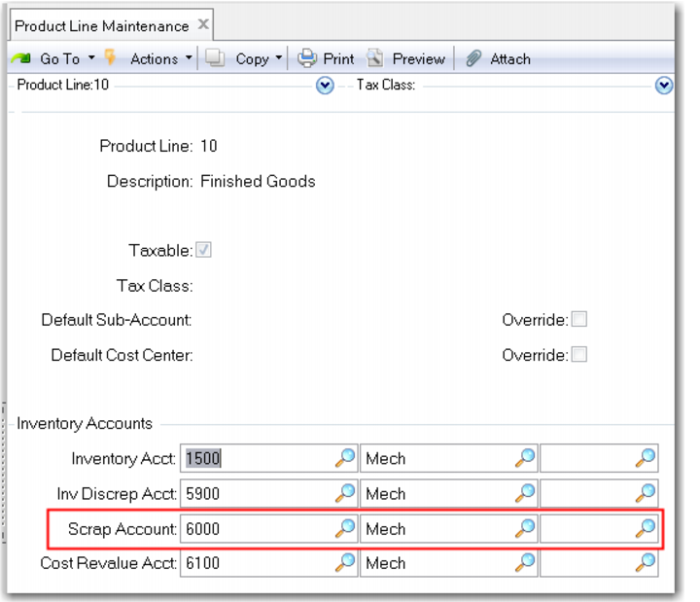
Review Product Line Maintenance (12.1); note the scrap account 6000-MECH.
In this exercise you will use Work Order Maintenance (16.1) to create and issue a work order. You will print the picklist, issue the components, and tract their cost into the WIP account.
You will complete and receive the work order and report scrap. You will not report labor but will see that the system books labor (and burden) at standard when it is not reported.
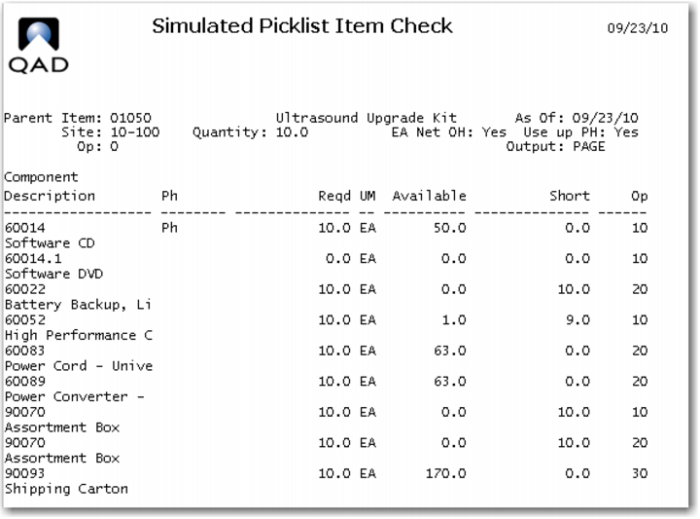
1 Use Simulated Picklist Item Check (13.8.17) to inquire on available inventory of the components needed to make the Ultrasound Upgrade Kit. Set the order quantity to 10 and leave operation at the default 0 to see components needed at all operations.
This view shows the CD's in inventory which will be issued because the item is a phantom. You are short 10 of the batteries, 9 of the CPU's and 20 of the Assortment box.
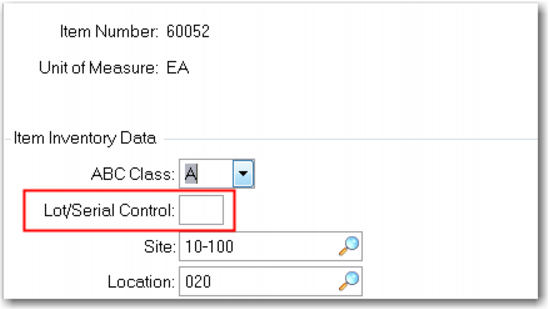
The high performance CPU is a serial controlled item, to simplify the exercise Use Item Inventory Data Maintenance (1.4.5) to delete the S from the Lot/Serial Control field.
Note the default site and location
2 Use the Receipts Unplanned (3.9) transaction to receive enough inventory to complete the exercise. Receive 20 of the 60022 battery, 19 of the 60052 CPU and 40 of the 90070 box. You do not yet need to receive any of the new DVD's as there are more than enough of the CD in stock. All the items should default to site 10-100 and location 020.
You could run the Simulated Picklist again to be sure the transactions worked.
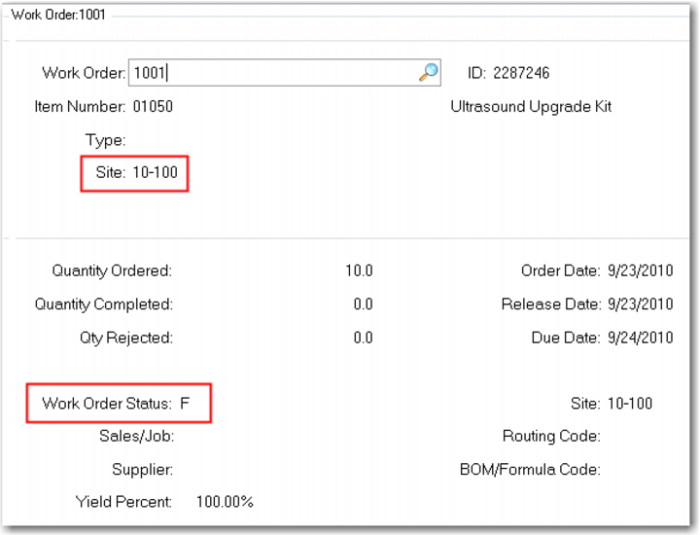
3 Use Work Order Maintenance (16.1) to create a work order for 10 each of the 01050 at Site 10-100. Leave the Status at F, Firm Planned.
4 Use Work Order Release Print (16.6) to release the work order (change its status to R) and to print a Picklist. Review the Picklist and scroll down to see the Routing.
Use Work Order Component Issue (16.10) to issue the components as defined on the Picklist.
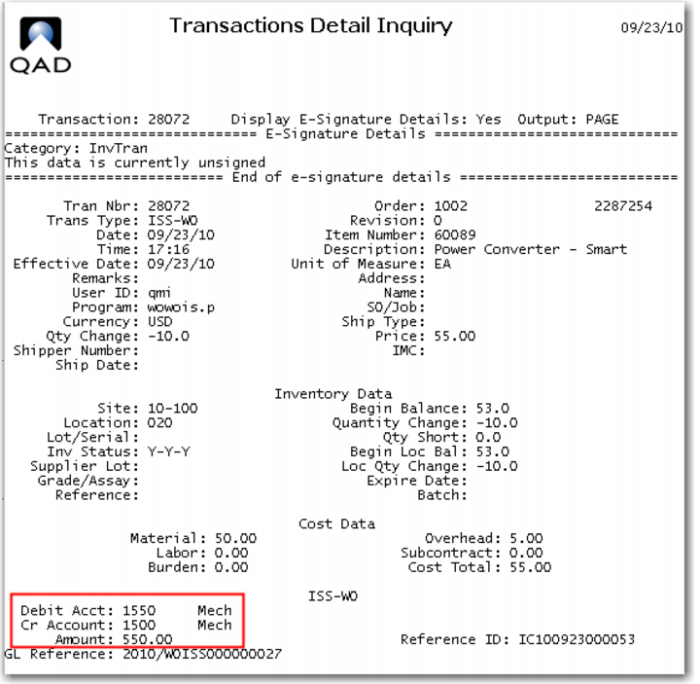
Use Transaction Detail Inquiry (3.21.1) to review the inventory effects of the material issue. As you enter the transaction detail screen, the Transaction field will default to the last transaction the system processed. This will be the last material issue. You can scroll (or use the lookup to see recent transactions. Find one of the ISS-WO transactions and go to the next screen. (Note: Though we have deleted the Serial control for the CPU you can see the system issue one with a serial number.)
Here you will see the complete details of the ISS-WO (issue work order) transaction. The key points for this exercise are the Debit to WIP, account 1550 and the Credit to Inventory account 1500. This transaction was processed for all the components issued to the work order. In the example screen you see the ISS-WO for the 60089 Power Converter. You see the value of inventory reduced by 550.00 and the value of WIP for order 1002 increased by that amount. Remember all inventory transactions are booked at GL Standard Cost.
The total amount of increase in WIP is the sum of the material cost of the 01050, at GL Standard.
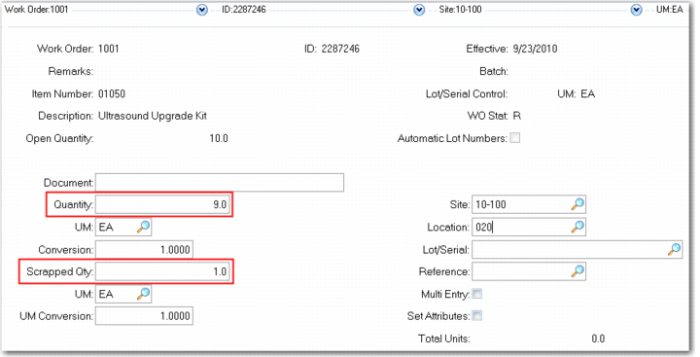
5 Use Work Order Receipt (16.11) to receive 9 units into location 020 and report 1 unit scrap. Be sure to check the Close box.
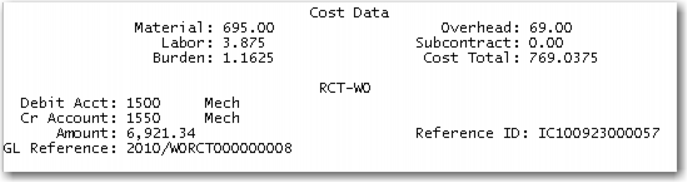
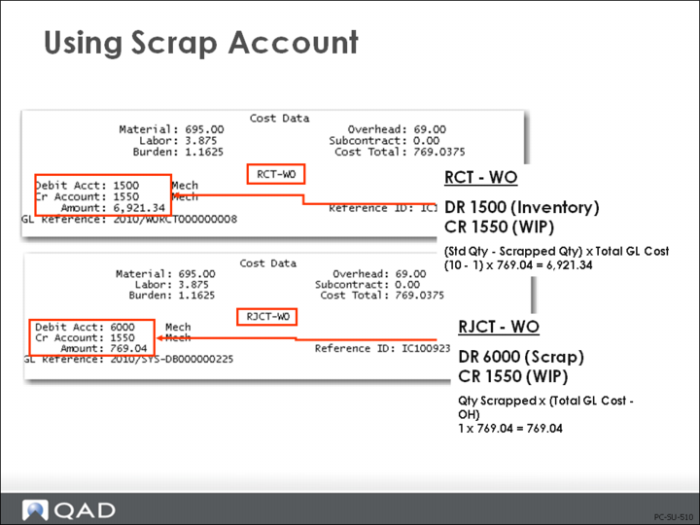
Use Transaction Detail Inquiry (3.21.1) to review the inventory effects of the Work Order Receipt. The last transaction is the scraped unit, the previous transaction is the receipt. The RCT-WO shows the WIP account 1550 being credited 6,921.34 with is the cost of 9 of the 01050 at a GL cost of 769.0375. Inventory has been debited with the same value.
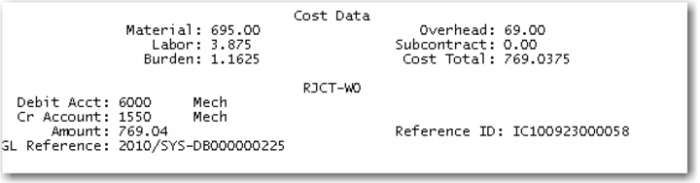
On the scrap transaction RJCT-WO you see the standard cost of one unit being debited to the Scrap account 6000 and the corresponding credit to WIP. This writes off the cost of the scrap to an expense account rather than costing it into the product cost.
Transactions Detail Inquiry
• At work order issue and during manufacturing, WIP is debited the full standard quantity × standard cost (for each lower-level component and this-level item)
Total GL Cost * Standard Qty
(769.04 * 10) = 7,690.40
• Upon completion of production, Inventory is debited the actual quantity of good units (standard quantity - scrapped quantity) × standard cost (see RCT-WO in figure above)
(Standard Qty - Scrapped Qty) * Standard Cost
(100- 1) * 769.04 = 6,921.34
• Scrapping is booked by crediting for the number of scrapped units ∗ (standard cost - overhead), and debiting the Scrap account for the same amount. Number of Scrapped Units ∗ (Standard Cost - Overhead)
10x (769.04 = 769.04
• A disadvantage of using scrap with work orders is that scrap incurred at all stages of manufacture is valued at full GL cost
• In the repetitive modules, scrap is valued at the cumulative cost up to the operation where the scrap is incurred
Summary
As you can see, loss costing and reject costing lead to different item costs. In the case of loss costing, the item costs will be higher. This also has an influence on margin calculations and on the calculations of Cost of Goods Sold. Please note this when making the decision between scrap and yield costing.
It is important that you notice that loss and reject costing should not be used at the same time. You will have to decide which of the two methods fits your business environment best.
Formula Maintenance
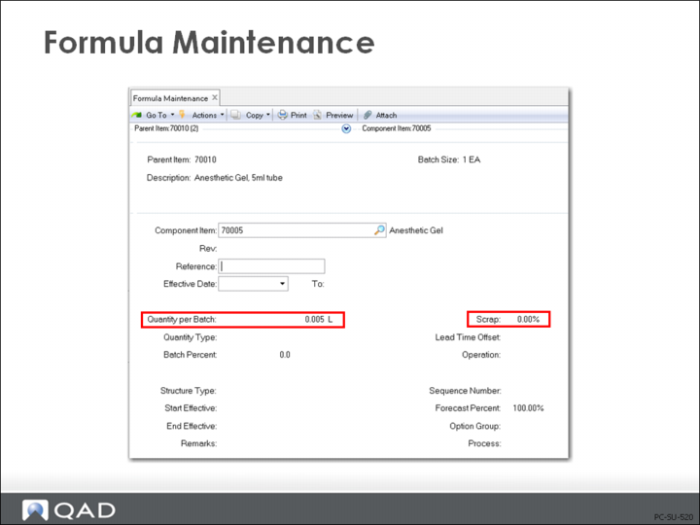
Formula Maintenance (15.5) operates in much the same way as Product Structure Maintenance for cost purposes. This screen allows data to be entered as a Qty Per as above and also allows entry as Qty Per Batch and% Batch. A structure entered as a formula cannot be changed in Product Structure Maintenance, but the reverse is permitted.
Batch Quantity is set for the item in a site and used in Formula and Process definition, but QAD Enterprise Applications still calculates costs as cost per unit, not cost per batch.
Note: If Batch Quantity does not equal Order Quantity (see Item Planning Maintenance (1.4.7) or Item Site Planning Maintenance (1.4.17)) then a method variance will result.