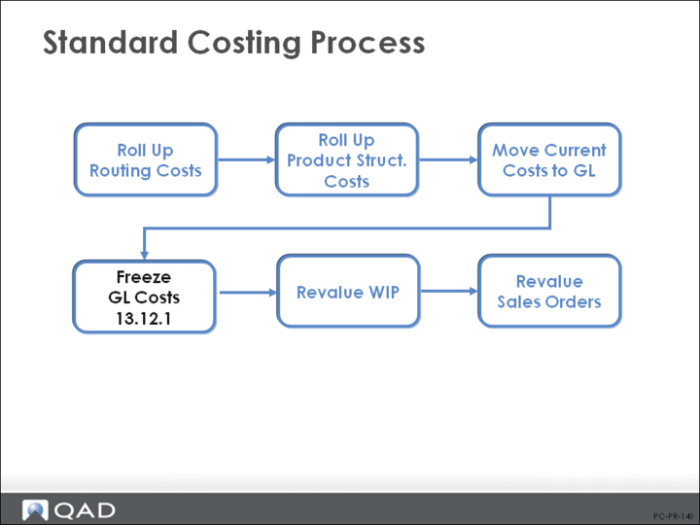
Freeze GL Costs
Once standard costs are established, you can freeze them. For example, you can set standards or create a reference cost set that won’t change over the year. Any cost set can be frozen. Running the Cost Roll-Up Freeze/Unfreeze (13.12.1) simply marks item costs for this cost set and site as frozen. When routing and product structure cost roll-up functions encounter an item with frozen cost, they use that cost rather than recalculating it.
The reason for doing this is best illustrated by an example. If you have a common manufactured subassembly X that is used in products A and B, and you add another product C that uses this subassembly, when you roll up the cost of product C, the system will automatically roll up the cost of all of C’s components first, including subassembly X. And, if the product structure/BOM or routing has changed in any way, subassembly X can get a new cost, meaning that you will also need to recalculate costs of items A and B. If you do not want this to happen, use Cost Freeze to freeze the cost of manufactured subassemblies such as item X.
Freezing your costs can also speed up roll-up calculations. Once item cost is calculated and frozen, all subsequent cost roll-up calculations at this site for this cost set simply use the frozen cost.
Note: The freezing process requires careful control to ensure that subassemblies that do require rolling up are unfrozen. It could be difficult to carry out this check on complex BOM structures.
Warning The cost freeze only prevents costs from being recalculated by the system. It does not prevent manual changes in item cost data maintenance functions, cost set copy functions, or operation cost calculation.
Cost Unfreeze
When frozen costs need to be recalculated using the roll-up functions, simply run Cost Freeze/Unfreeze to mark the costs as no longer frozen. Or copy the costs to another cost set and roll up that cost set.
Use the Cost Roll-Up Freeze Report (13.12.2) to review cost total for items, when updated, and whether costs are frozen or unfrozen.
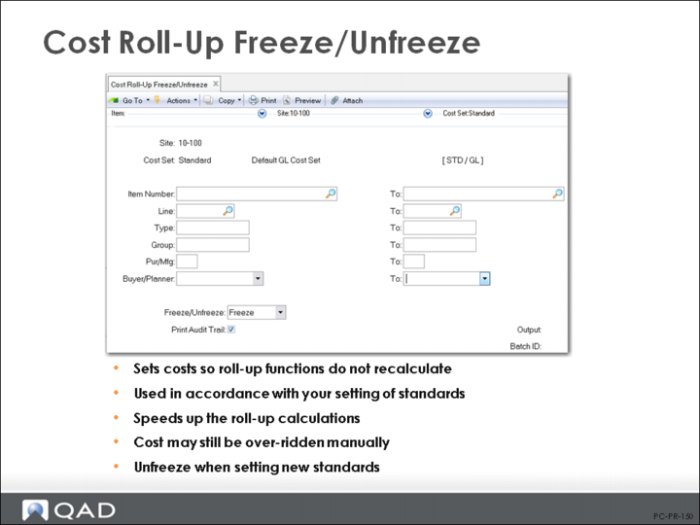
Cost Roll-Up Freeze/Unfreeze Screen
Key fields in Cost Roll Up Freeze Unfreeze (13.12.1) are:
Item Number / Prod Line / Item Type / Group / Pur/Mfg / Buyer/Planner
The selection criteria allows you to freeze (or unfreeze) costs of specific types of items.
Freeze/Unfreeze
Freezes or unfreezes item costs by cost set against roll-ups, usually after roll-ups have been performed.