Exercise 1: Review Accounting Records
1 Review the Domain/Account Control (36.9.24). You should be in Entity 10USACO. If not check the workspace you are in; it should be 10USA USA Division [USD]. The currency code in brackets is the currency for this entity. Use the Next button to cycle through all the screens to ensure that all account fields have a value in them. Not all sub-account or cost center fields will have values. You can uncheck the Verify GL Accounts selection.
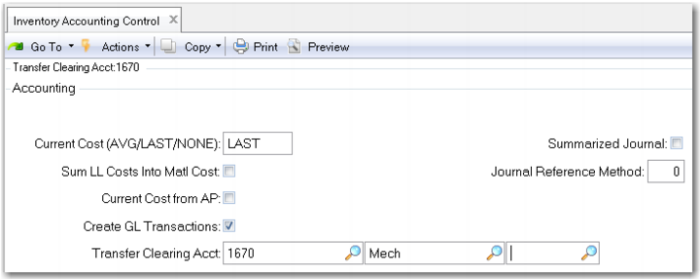
2 Review Inventory Accounting Control (36.9.2). (In QAD SE this is in Inventory Control (3.24)) Set the Current Cost field to LAST. This allows the system to update current costs automatically based on the last purchase cost or work order cost and ensures the system will generate variances when these costs differ from the GL or Standard cost. The use of average costing is covered in another course.
The Supplies Kit (01011) has two purchased components: 01012 Sterile Probe covers and 01013 Sterile Wipes. A kit requires one box of the 01012, and two boxes of the 01013. Both of these items are purchased from Heron Surgical Supply, vendor number 10S103.
3 Use Item Planning Maintenance (1.4.7) to review the Purchase/Manufacture code to ensure it is P for both items 01012 and 01013.
4 Use Item Cost Maintenance (1.4.9) to review the material cost. The This Level Material cost for item 01012 should be 2.50 in both the GL and the Current cost sets. If not, make it so. This Level Material cost for item 01013 should be 1.00 in both the GL and the Current cost sets. If not, make it so. Both of these items are lot controlled.
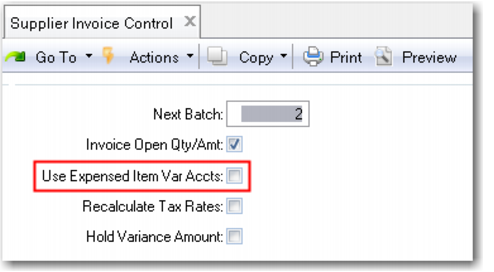
5 Review Supplier Invoice Control (28.24); uncheck the Use Expense Item Var Accts: This indicates you are not calculating variances for Memo items but expensing their entire cost.