Exercise 2: Issue Purchase Order
1 Use Purchase Order Maintenance (5.7) to create a purchase order for these two items, 01012 and 01013, from supplier 10S1003. Let the system assign the next PO number. Use the lookup icon on the Supplier field to find Heron Surgical Supplies. Advance to the line item screen accepting the default values for all other fields.
Line 1; enter Site 10-100,use tab or enter to by-pass the requisition field, in the item number field enter 01012, in the quantity field enter 100.
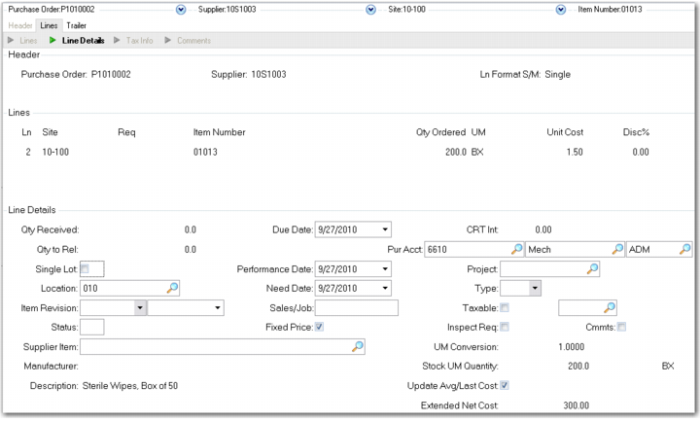
Cycle through the screens until you return to line items screen, then, enter the 01013 for a quantity of 200. Note that the system has brought up the GL standard cost for both items. However for the 01013 you have a recent e-mail from the supplier saying the price has gone up to 1.50 per box. Change the unit cost to 1.50. Your PO line 2 should look like this: note that the Update Avg/Last Cost field is checked.
If you thought the new cost of 1.50 for item 01013 was a one time event or aberration, you could uncheck the line item Update Avg/Last Cost field and the system would not update the current cost based on the PO and line item.
The Quality Assurance Lab has called and asked to buy 50 boxes of the sterile wipes as they use them for testing and cleaning purposes. Add a third line item for 50 of the 01013 at the cost of 1.50 but in the Type field make these Type M, memo items. This will charge them to an expense account not inventory.
Complete the PO through the trailer and note the total PO cost of 625.00.
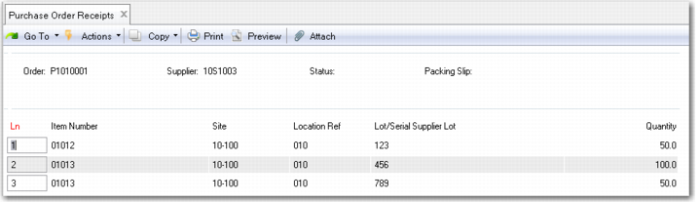
2 Use Purchase Order Receipts (5.13.1) to receive one half the order quantity of each of line one and two and all of line three. As these are lot controlled items you will need to add a lot number to the receiving inventory transaction. The example uses Lot 123 for line one and 456 for line two and 789 for line three. Your Purchase Receipts screen should look like this.
Click Is All Information correct Yes to complete the transaction.
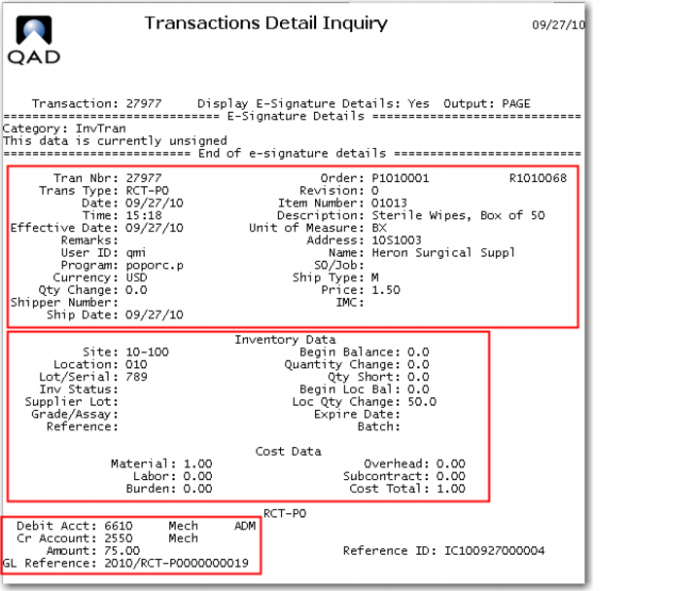
3 Use Transaction Detail Inquiry (3.21.1) to review the last three transactions. The display comes up on the last transaction processed. Use the scroll arrows to move to the previous transactions. The last transaction is the receipt of the 50, 01013 memo items.
The top frame of the transaction detail displays all relevant data about the transaction. Its type, RCT-PO, receipt - purchase order; the PO number. It shows the date, time and user ID of the person making the transaction and the effective date of the transaction. It shows the item number and description of the subject of the transaction, the address code and name of the supplier of the goods, and the PO price of the item and the currency code the transaction has been made in.
The second frame displays all relevant inventory data; the site and location where the goods were received; the lot/serial number assigned, and the location quantity change. Had the information been available and needing to be recorded the inventory record can also maintain, the inventory status code of the material in this location, the supplier lot number, grade or assay codes, expiration date, batch number and a general purpose reference field.
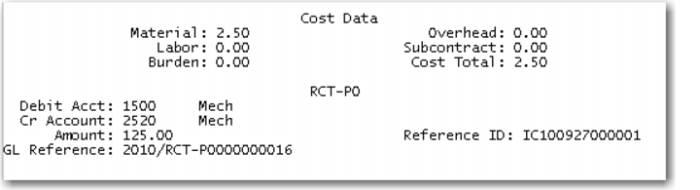
The GL Standard cost data is displayed in the five cost elements and a total. The bottom set of data show the specific GL accounts that have been debited and credited what amounts to record this transaction, and the GL reference in case the transaction needs to be found in the general ledger.
In this case the system has debited the Purchases account (6610) and credited the Expense Item Receipts account (2550), 75.00 the total cost of 50 units at 1.50 each. You have selected not to report variances for memo items.
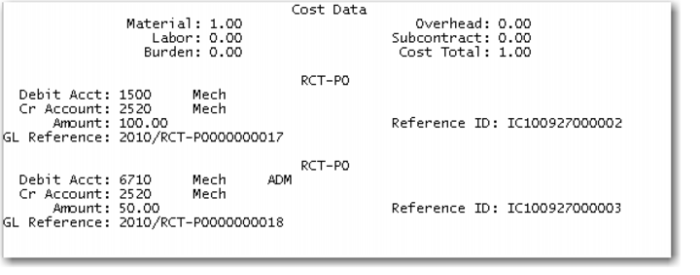
The first previous transaction is the partial receipt of 100 of the 01013, looking only at the account data:
Here the system has debited Inventory (1500) and credited PO Receipts (2520) the 100.00 GL Standard cost. And has debited PO variance (6710) and credited PO Receipts (2550) 50.00 the difference between the PO cost and the GL cost. The two credits to PO Receipts total the amount to be invoice by the supplier, 150.00.
The second previous transaction is the receipt of the 50 each 01012. As this transaction is at standard there is just the debit to inventory and the credit to PO Receipts.
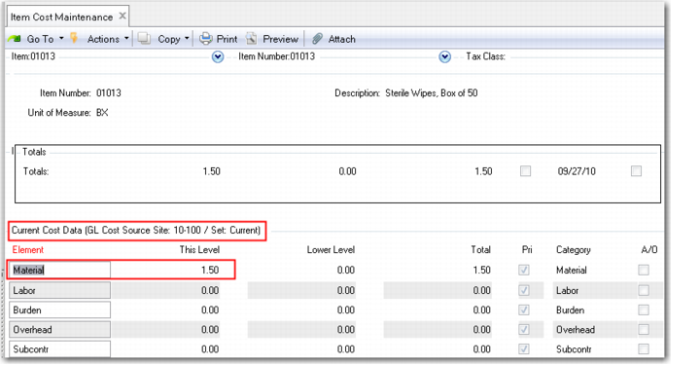
Review the Item Master Cost (1.4.9) to see that the Current Cost has been updated to 1.50.