Maintain Supplier Items
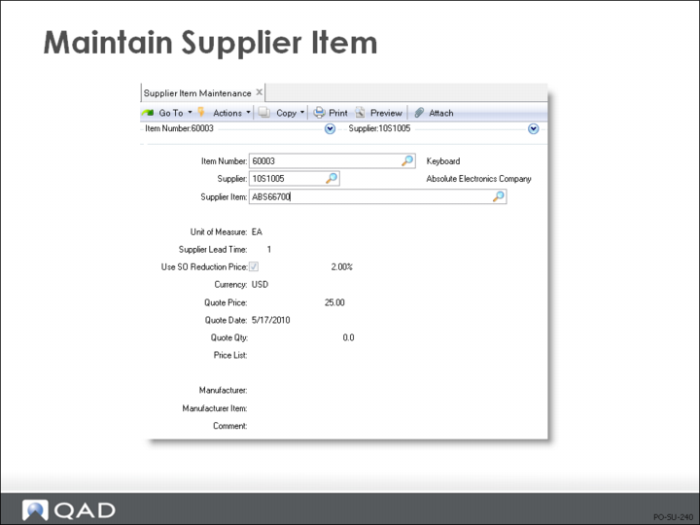
Whenever you enter an item number not defined in your item master, the system checks to see if it is a supplier item. If a match is found, your internal number is displayed on the order line. The item number you entered is also displayed in the Supplier Item field. Both are printed on all communications to the supplier
Also, the supplier item number displays on the Purchase Order Receipts (5.13.1) screen, in case your supplier’s packing list neglected to include your item numbers
Field Definitions
Item Number
Your internal item number related to this supplier item number
Supplier
The address code identifying this item's supplier
Supplier Item
The item number this supplier uses to identify this item
Supplier Lead Time
The quoted supplier lead time expressed in calendar days
• Does not include inspection time.
For reference only and can appear on some selected reports and inquiries
• In particular, prints on the purchase requisition for the buyer's use
Use SO Reduction Price
• Used in the Enterprise Material Transfer (EMT) order processing environment
• Indicates whether to use a percentage to calculate the transfer price from an external sale order price
Quote Price
The price per unit the supplier quoted for this item
Quote Date
The date the supplier quoted you this price. The default is the system date. Date is for reference only and can appear on reports and inquiries
Quote Qty
The minimum quantity you must order to be eligible for the quoted price
Price List
The code for the price list associated with this supplier item. For reference only and can appear on reports and inquiries
Manufacturer
This is the code identifying the original manufacturer of this item, if different from the supplier
It is validated against predefined values entered in Generalized Codes Maintenance (36.2.13), if any. It is for reference only and can appear on reports and inquiries
Manufacturer Item
The original manufacturer's item number for this item. For reference only and can appear on reports and inquiries