Set Up Item Planning Data
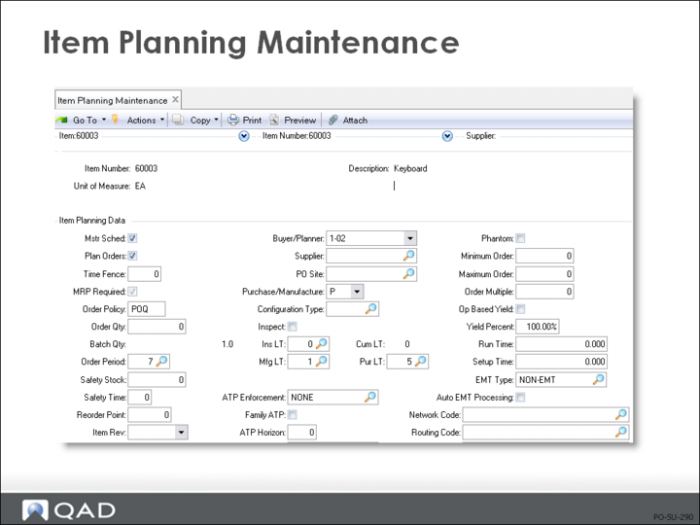
This section covers Item Planning Data. This data is important in many modules in QAD Enterprise Applications. In Purchasing, buyer/planners normally maintain this data.
• Item planning data controls planning and manufacturing functions
• If an item is used at multiple sites, planning data can be set up differently for each site using Item-Site Planning Maintenance (1.4.17)
• The buyer (buyer/planner) normally maintains this screen for purchased items (Pur/MFG = P)
Field Definitions
Plan Orders
Indicates whether Material Requirements Planning (MRP) should create planned orders for this item. Planned orders are orders with a suggested order quantity and due date calculated by MRP to meet planned future demand.
Order Policy
A code controlling the MRP process for this item/product
• Operates in combination with the Plan Orders field
If Order Policy = [blank], MRP does not plan this item, regardless of the Plan Orders field
If Order Policy is not blank, MRP plans the item
• Order policies can be:
POQ, Period Order Quantity: A planned order is created to cover the requirements for a specified number of calendar days
FOQ, Fixed Order Quantity: Planned orders are created with the order quantity specified in the Order Qty field
LFL, Lot for Lot: A separate MRP planned order is created to satisfy each net requirement
OTO, One Time Only: A single order is created with an order quantity of one
Would not be used for inventory items, but could be used to plan project activities and milestone events that happen only once
Any other non-blank value is processed as LFL
Order Qty
The normal order quantity for this item or base process
Order Period
Operates only if the Order Policy = POQ
• The number of calendar days to cover by one MRP planned order
The default is 7 days
• If there are any, it will be validated against predefined values entered in Generalized Codes Maintenance (32.6.3)
Safety Stk
The quantity of this item to be maintained in inventory as protection against fluctuation in demand and/or supply
Safety Time
The number of working days early that MRP plans to receive orders for this item, as a hedge against late deliveries
Reorder Point
The inventory level at which this item should be reordered
Rev
An optional code identifying the engineering revision of this item. If specified, it is validated against predefined values entered in Generalized Codes Maintenance (32.6.3)
Buyer/Planner
An optional code identifying the person responsible for planning and ordering this item. If specified, it is validated against predefined values entered in Generalized Codes Maintenance (32.6.3)
Supplier
An optional code identifying the normal or preferred supplier for this item
PO Site
Where the purchase order for this item is to be generated
• Determines which purchasing department takes action on this requisition
• If not using distributed purchasing, this field can be left blank
Pur/Mfg
Code indicating if an item is manufactured, purchased, or configured to order
• Other special item codes identify items used for planning purposes only
• If there are any, it will be validated against predefined values entered in Generalized Codes Maintenance (32.6.3)
• Purchase/manufacture code controls how the system explodes forecasts, plans and creates orders, and calculates costs for the item
• Code options include the following.
P (Purchased): Item is normally purchased
D (DRP): Item is usually supplied internally from another site
M (Manufactured): Item is normally manufactured
R (Routable): A special type of manufactured item, made only when needed by an upper level assembly
C (Configured): The item is configured to order
F (Family): A special type of item used for planning
Never actually made or stocked
For multilevel master scheduling
Family items are set up with a planning bill
Pur LT
The normal or average number of calendar days it takes to complete a purchasing cycle for this item, from the date the need for a purchase is recognized to the date the item is received. Does not include inspection time
Inspect
Indicates whether this item is to be inspected after receipt
Ins LT
The normal or average number of working days needed to inspect this item after it is received
Min Ord
The minimum quantity of this item to be ordered on a single order
Max Ord
The maximum quantity of this item to be ordered on a single order
• Default is zero, which means there is no maximum.
• Does not prevent you from ordering more than this quantity
Ord Mult
The multiple in which orders for this item are placed. The default is zero, which means there is no multiple
Yield%
The percentage of any order expected to be in usable condition. Default is 100%
GL Cost Data
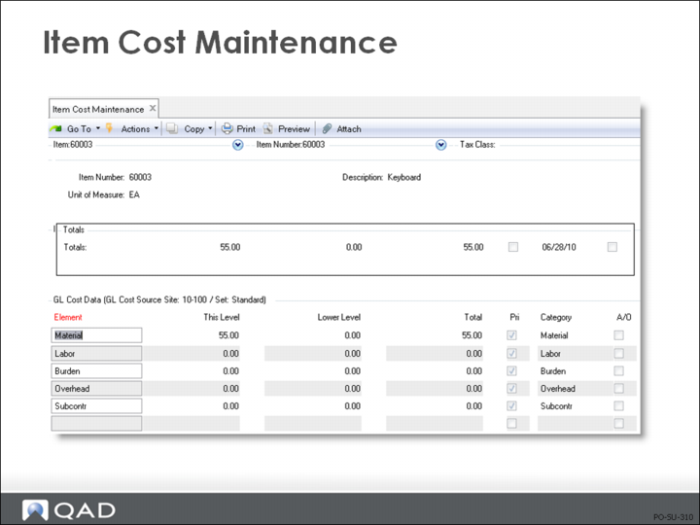
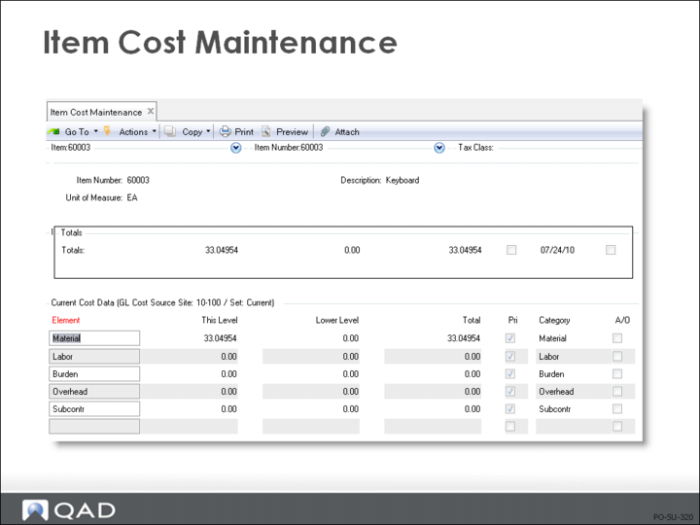
• Item Cost Maintenance (1.4.9) maintains the price, tax status, and cost for items. Every item has at least two cost sets:
• GL
• Current
• The GL cost is the default price on a purchase order if there is no supplier item or price list price
• Other cost sets can be maintained in the Cost Management module
• If an item is used at multiple sites, you can enter different costs for each site using Item-Site Cost Maintenance (1.4.18). Price and tax status are the same for an item at all sites
• Functions that create general ledger transactions use the item GL cost of the item. Standard cost is the default, but you can change it to average cost using Cost Set Maintenance (30.1)
• You can change standard costs manually. The system maintains GL method average costs as it processes inventory transactions.
• For sites using standard cost. Any difference between the standard cost (minus this-level overhead) and the purchase order price is posted to purchase price variance.
• For sites using average cost. The GL cost is re-calculated on each receipt.
• Purchase Price Variance (PPV) calculated by the system during PO receipts uses material cost only
• Overhead is accrued during PO receipts and generally represents fixed overhead, or costs such as freight
• If there is no price list/supplier item/price on a part, this level material cost from the GL cost set (standard) will default as the purchase unit cost
• Any difference between the purchase cost and the GL cost will be treated as a PPV at PO receipt, excluding any this level overhead amounts
• You can use current costs for comparison in combination with standard or average costing
• The system keeps current costs by GL average or last purchase or manufacturing cost
• The current cost can be set to the new average or last cost with each receipt