Print the Purchase Order
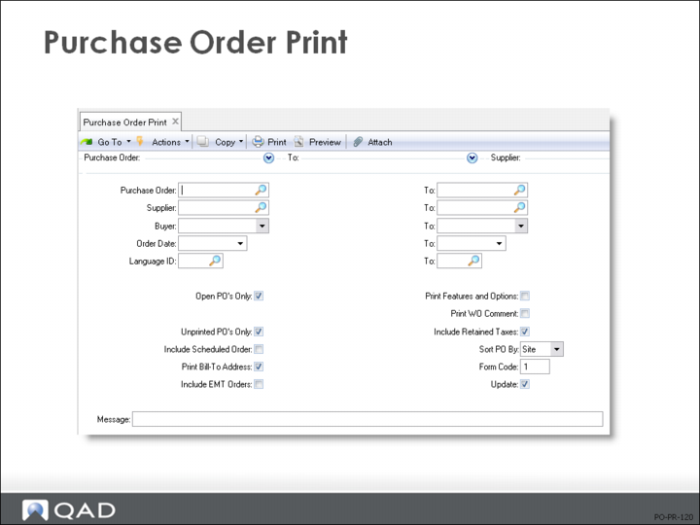
Purchase Order Print
• Since a purchase order or blanket order is a legal document, it usually should be printed only once
To make sure of this, once an order has been printed, the Print PO field in Purchase Order Maintenance (5.7) is updated by the system
If Unprinted PO's Only = Yes, only orders which have not yet been printed are printed
If you need to reprint an order, set Unprinted POs Only = No
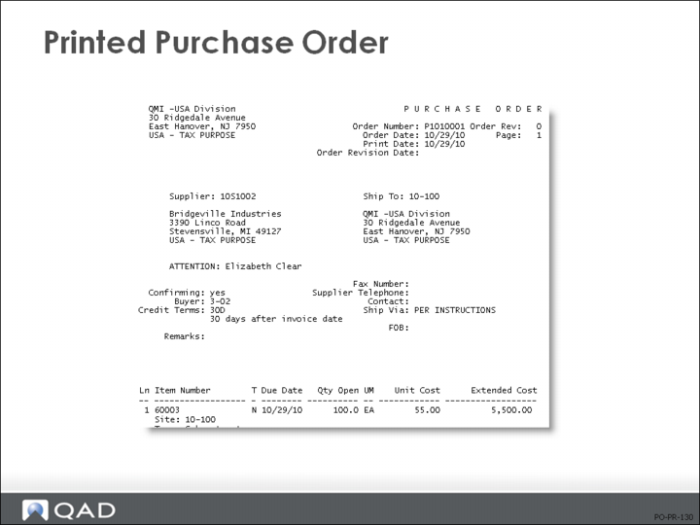
The order document is printed with the message *** DUPLICATE ***
If you need to reprint an exact copy of an order without the *** DUPLICATE *** message, you must use the maintenance function and reset the print field to No manually
• If an existing PO is changed, its revision number is updated and the PO can be reprinted
• Date change information is noted in the PO Change History Report (5.9.21)
This report lists various changes made to POs, such as revisions, item, quantity, and price changes, but date changes are not included
This data is recorded in the system only if you set the Keep Booking History field to Yes in Purchasing Control (5.24)
Date change information applies to PO Change History Browse (5.9.20) and PO Change History by Item (5.9.22)
Only the effective date is kept; that is, the date the change occurred, not any changes to due date, perform date, need date.
Note: You can also see the transaction in Transaction History (3.21.1)
Printed Purchase Order