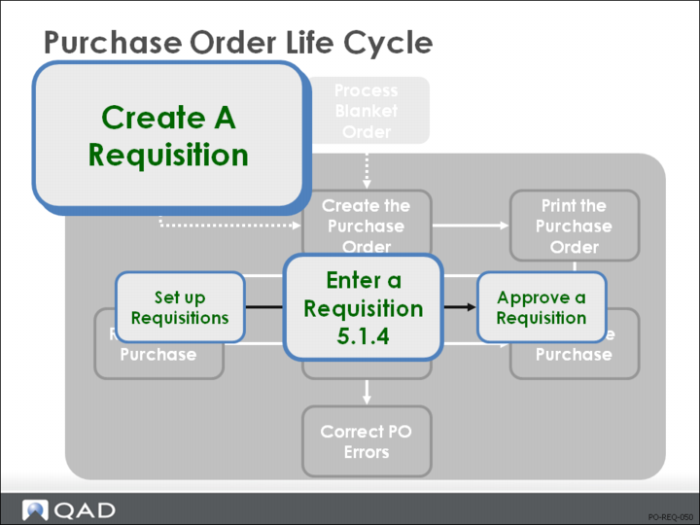
Enter a Requisition
• A requisition is a way of communicating demand for purchased materials
• It records the need for a specified quantity of an item at a specified site on a specified date
• PO Site specifies which site negotiates the purchase
• Requisitions are usually generated by MRP through Planned Purchase Order Approval (23.11), but can be entered manually
• A requisition generated by MRP has an Item Number, Site, Qty, Release Date, and Need Date
MRP calculates both the Qty and Need Date, setting the Release Date to the Need Date less the purchasing lead time for the item
PO Site defaults from the item master
• On manual requisitions, the Item Number, Site, Qty, and Need Date are required
• MRP generates a requisition when you approve an MRP planned purchase order
MRP then treats it as a firm planned order
If a release date passes without an order, MRP issues an action message
• New requisitions are approved, printed, and referenced on a purchase order
The purchase order quantity consumes the requisition quantity until it is zero; then the requisition is deleted
Requisitions should be deleted if they cannot be filled
• The referencing of requisitions can be controlled through purchase approvals
If Approvals Required = Yes in Purchasing Control (5.24), purchase orders must reference approved requisitions: the requisition number can’t be blank
When approvals are used, each new requisition is assigned an Approval Code based on the Site, Product Line of the item, Requested By, and Extended Amount
The Approval Code is the name of the authorized approver
To approve a requisition, run Requisition Approval Maintenance (5.1.16), supplying the Approval Code
• Requisitions have no financial effects
Pur Acct is not used on requisitions for inventory items
• On requisitions for noninventory items, you must enter all information, including the Unit Cost and the Purchases Account, which are used to determine approval level
The Purchases Account is passed to the PO and debited by Purchase Order Receipts (5.13.1)
• You do not have to use approvals
Simply do not set up any approval codes
• Requisitions are not used with supplier schedules
Note: Companies seeking economies of scale can pass requisitions from many sites to a central purchasing site, possibly on another database.
Simply specify a PO Site on the requisition
When Approved Requisition Print (5.1.17) is run at the PO Site, it sweeps through all sites, including sites on other databases, and prints all requisitions specifying that PO Site
The purchase order entered at the PO Site can then reference the requisitions from the remote sites (the databases must be connected)
These requisitions are consumed, and MRP is updated
When the items are received, inventory is updated in the remote database, but the receiver is created for matching on the PO Site database
• Requisitions can be referenced on blanket orders and regular purchase orders
When a requisition is referenced on a purchase order, the requisition quantity is reduced by the quantity ordered
When a requisition quantity is satisfied by purchase orders, the requisition is automatically deleted
Subsequent references to that consumed requisition are treated as though the requisition were non-existent
A requisition recorded on a blanket order is not reduced or deleted until the blanket order is released to create a purchase order
• Requisitions do not specify a supplier or a price
For this, consider using blanket orders instead
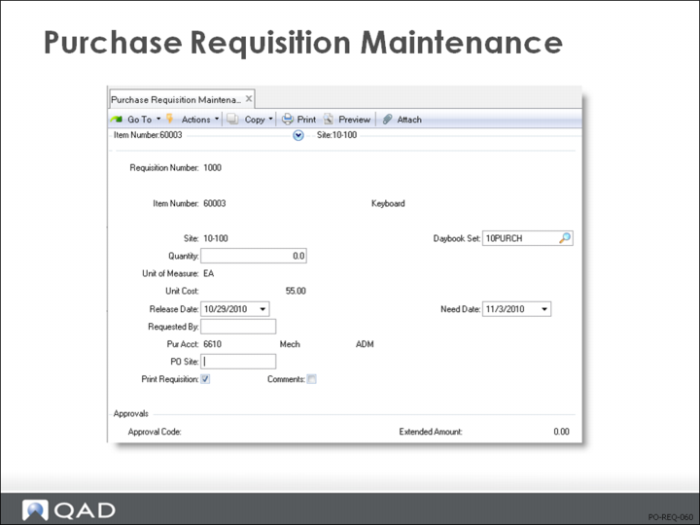
Purchase Requisition Maintenance
Requisition
Requisition number uniquely identifies a purchase requisition--an authorization to purchase a particular item or product in a specific quantity for a specific due date
Requisitions can be entered manually or created by approving MRP planned orders
• Requisition number selects specific information to appear on reports and inquiries
• Some companies assign specific ranges of requisition numbers to each buyer or department
Make sure that codes are entered consistently by entering the allowed codes into Generalized Codes Maintenance (36.2.13)
The system verifies entered codes against these predefined values, preventing incorrect codes from being entered
Item Number
The item that this requisition is for
• Requisitions can be entered for non-inventory or inventory items
Non-inventory requisitions can be for items such as office supplies
In the Item Number field, you can enter the brand, catalog number, or even a short description such as “Pencils” or “Copy Paper”
The unit cost of the item can be recorded and comments can enter a detailed description of the item
If an inventory item is entered, its description is displayed
If a non-inventory item is entered, the description “Item not in inventory” displays
Site
The site that needs the requisitioned items
• Site codes identify areas where inventory is manufactured or stored: an off-site storage area, a distribution center, a warehouse, a manufacturing facility, or any combination of these
• When a purchase order or blanket order is entered for this requisition, the line item site is set to the site on the requisition
This is the site to deliver the purchase items to
• Site is also used when calculating requisition approval levels based on the requisition amount
Different approvals can be required for each site, product line, person requesting, and purchase account (for non-inventory items)
• Requisitions, approvals, orders, and other purchasing documents and reports can be selected and sorted by site code
Qty
The quantity of this item needed at this site by the need date specified
• If the requisition is created using the Planned Purchase Order Approval (23.11) function in MRP, the requisition quantity defaults to the MRP planned order quantity
• Quantity and cost determine the approval level required for this requisition
The level depends on the purchase amount--the requisition quantity multiplied by the unit cost
For inventory items, the unit cost is taken from the Item/Site GL material cost
For non-inventory items, the unit cost is taken from the requisition
• Requisition quantity and cost print on all requisition reports and documents
UM
Validated against predefined values entered in Generalized Codes Maintenance (36.2.13), if any
• If a non-inventory item is entered unit of measure defaults to blank
Otherwise it defaults to the item unit of measure
• The unit of measure for the requisition quantity is usually the purchasing unit of measure
This is not always the same as the item unit of measure
• When a purchase order or blanket order references this requisition, the line item unit of measure defaults to the requisition unit of measure
If left at this value, the purchase order and receipt transaction use this unit of measure
• When an inventory transaction references a unit of measure other than the item unit of measure, the system looks for a conversion factor
Example: The item can be held in inventory in the unit of measure [EA] but sold by the [CS], case. A unit of measure conversion can be set up to define the number of [EA] held in a case. If a [CS] holds 25 [EA], the Alternate UM is [CS] and the UM conversion is 25.
Unit Cost
The normal price you expect to pay for one unit of this item, expressed in the unit measure entered on the requisition
• Quantity and cost determine the approval level required for this requisition
The level depends on the purchase amount—the requisition quantity multiplied by the unit cost
For inventory items, the unit cost is taken from the Item/Site GL material cost
For non-inventory items, the unit cost is taken from the requisition
• Requisition quantity and cost print on all requisition reports and documents
• Unit cost is entered manually only for non-inventory items
When a purchase order is entered for the requisition, the suggested unit cost displays on the line item as the line item unit cost
It can be changed manually
Release Date
Release date is when a purchase order should be released for this requisition to get delivery of the items when they are needed
• For requisitions created using the Planned Purchase Order Approval (23.11) function, release date is set to the need date less the purchasing lead time for the item
• For requisitions entered manually, release date defaults to system date
Enter a ? to calculate release date as need date less the purchasing lead time
• If this date arrives and a purchase order has not been entered referencing this requisition, MRP prints a “Past Due Release” action message
This MRP action message helps ensure you release purchase orders early enough, a reason to keep your item purchasing lead times up to date
Need Date
Need date is when the requisitioned items need to be delivered
• For requisitions created using the Planned Purchase Order Approval (23.11) function, need date is set to the due date of the MRP planned order
• For requisitions entered manually, need date is set to system date plus the purchasing lead time for the item
Enter a ? to calculate need date as the release date plus the purchasing lead time for the item
• If the need date arrives and a purchase order has not been entered referencing this requisition, MRP prints a “Past Due” message for this requisition
The requisition also appears on the Past Due Release Report and Inquiry
This MRP action message helps ensure you release purchase orders early enough, a reason to keep your item purchasing lead times up to date
Requested By
A code identifying the person who requested the purchase
• The system can use this field when calculating purchase approval codes
Pur Acct
This is the general ledger account code which is normally used to record purchases of non-inventory (expense) items
• The system calculates purchase approval codes for non-inventory requisitions using this account
• The expense account entered on the requisition displays as the default on the purchase order or blanket order line item
PO Site
If this requisition is for an inventory item, the PO site defaults to the PO site entered for the item. For a non-inventory item, the PO site defaults to the deliver-to site entered on the requisition
• The PO site is where the purchase order for this item is to be generated
• The PO site entered on the requisition determines which purchasing department takes action on this requisition
With distributed purchasing, some items can be purchased at one site for all other sites, allowing your company to take advantage of price breaks or quantity discounts on purchases for the entire company
• When the Requisition Print function is run at the PO site, it picks up all requisitions with this site, regardless of what physical database they are on
When an order is entered referencing this requisition, the system decreases or deletes the requisition from the database it was entered on
Note: If you are not using distributed purchasing, the PO site should always be the same as the item (deliver-to) site.
Print Requisition
• Yes = the requisition should be printed
• No = the requisition has been printed
The Requisition Print function automatically sets this field to No
To skip printing this requisition, set this field to No manually
Note: Normally a formal printed document should print once. The print field prevents the document from reprinting by mistake. To reprint it intentionally, change the print field back to Yes using the maintenance function.
Approval Code
An approval code identifying the type of approval required for this purchase requisition
• The system calculates a required approval level for any purchase requisition, whether it is manually generated or created by MRP
Requisitions requiring approval cannot be referenced on a purchase order or blanket order until they have been approved
• Approval codes can have up to four levels of people required to approve a purchase requisition, depending on the purchase cost
Approval amounts can be calculated by site, product line, person requesting, and purchase account (for non-inventory items)
• Approval information is printed on requisitions waiting to be approved
When approvals are entered, an appropriate approval code must be recorded
• The approval code used to approve the requisition must be at a level at least as high as that required to approve the requisition
Otherwise the requisition is not flagged as approved
• It is not necessary to use purchase approvals for everything you buy
Only set up approval codes for things that require an approved requisition prior to purchasing. You might require approvals on all capital equipment purchases but not raw materials
If no approval code exists for the site, product line, purchases account, or requested by entered on the PO, you will not be required to go through the approval process
Approved
Yes = the requisition has been approved using Requisition Approval Maintenance (5.1.16) function
• Only approved requisitions can be printed and referenced on a purchase order or blanket order
Approved By
A code identifying the person who approved this purchase requisition
• The person who entered the approval might not be the person who actually approved the requisition
The system tracks both for auditing purposes
• Normally the person who approves the requisition should be the person authorized for this approval amount and approval code