Example: Item Data and Inventory
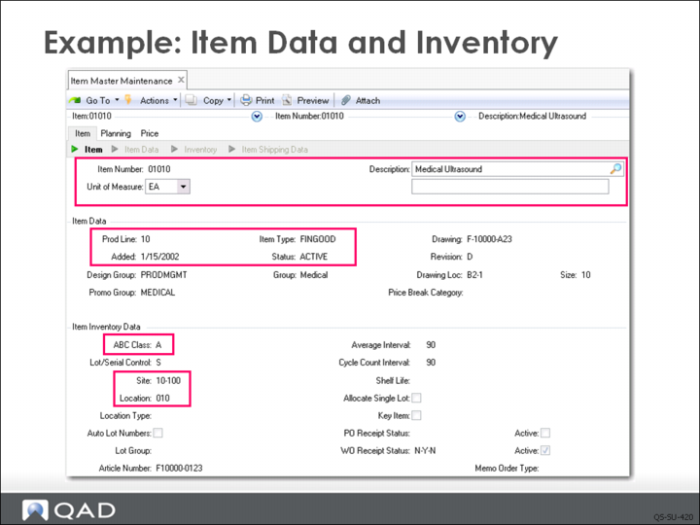
In Item Master Maintenance, QMI enters item number 01010, a description, and the item unit of measure and in the Item Data frame, product line 10. Remember, each item is assigned to one and only one product line. Enter the status code Active in the Status field. UoM and product line are the only fields (other than the item number) required by the system. UoMs are critical to both inventory control and costing. Careful consideration should be given to how you plan to use them.
Note: Other fields may be required when generalized codes validation has been added and blank is not an allowed value.
Important: Item Type, Item Status, and Item Group are optional and user defined. If you choose to use them, plan carefully since these codes offer additional capability in sorting browses, reports, and inquires.
In the Item Inventory Data frame, enter site 10-100; this will appear as the default site. In the Location field, enter 010, which will appear as the default inventory location for this item. The default site and location can be overridden on any transaction by the user by simply typing over the default value and entering the site and or location to be used for the current transaction.
Set the ABC Class code to A. This code is used for ABC analysis of inventory, managing inventory count tolerances, and cycle counting. After the system has some data and history to work from, it can compute the ABC class code.
When you click Next on the Inventory Data Frame, the Shipping Data frame appears. Leave this data blank for the time being and click Next to advance to the Item Planning Data frame.