Example: Item Planning
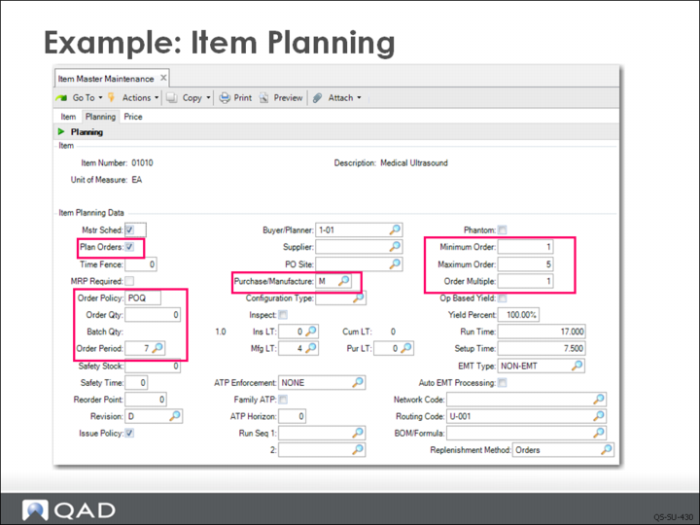
QMI’s Material Planning Department uses item planning data to determine how and when to replenish inventory. The planners want to let material requirements planning (MRP) automatically create planned orders for this item, based on demand, so the Plan Orders field is selected. When Plan Orders is selected and a value is specified in the Order Policy field—as it is in this example—MRP generates planned purchase and work orders to satisfy net requirements for this item. Since this is an end item, Mstr Sched is also checked.
Important: The Mstr Sched field is normally checked only for items that need to be forecast or otherwise planned. These are usually the end items the company sells. Reports, inquiries, and browses can be selected for master schedule items only, providing an excellent high-level filter.
The Order Policy determines the rules for planning orders. The ordering rule QMI applies to item 01010 is Period Order Quantity (POQ). This means that MRP calculates demand for this item over the number of calendar days specified as the Order Period (7 in this example) and creates one order to satisfy all demands in a seven-day period.
Note: Order policies and how they are used to calculate order quantities are covered later.
Another key field is Purchase/Manufacture. Item 01010 is manufactured, indicated by M. The manufacturing lead time is 4 days—the number of days it takes to complete the manufacturing cycle for this item. The Purchase/Manufacture field defines the source for this item at this site. Its other values and how they work are covered in more detail later in the course.
Example: Item Cost Data Frame
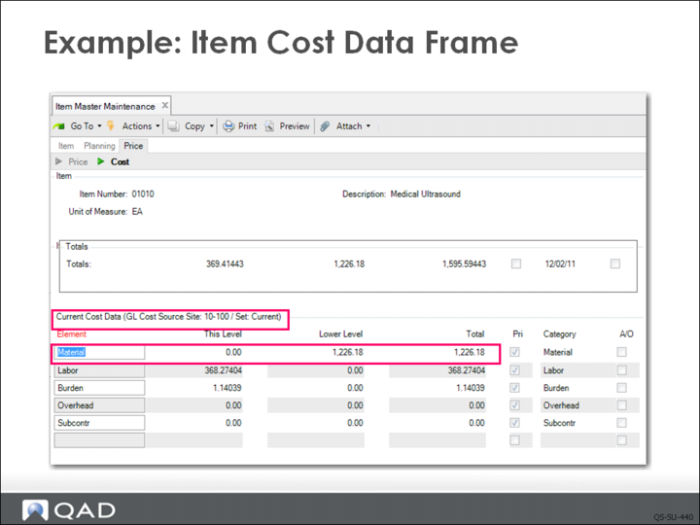
The item cost section is divided into three sections: price, general ledger cost, and current cost. The three frames appear sequentially with repeated clicks of the Next button.
In the first frame, QMI’s Marketing Department has determined a price of $2,500 for each unit.
Two cost frames display: GL costs display first and then current costs. This example focuses on the Current Cost Data frame.
For manufactured items, material costs are calculated based on actual costs recorded in the system. In the case of a purchased item, the material cost is the purchase cost. As a purchased item, it has no lower-level manufacturing related costs, only this-level costs.
Note: Two cost set frames display in Item Master Maintenance. The one shown here is the standard set; another frame displays GL costs. The relationship between cost sets is explored in a later chapter.