Define Work Centers/Machines
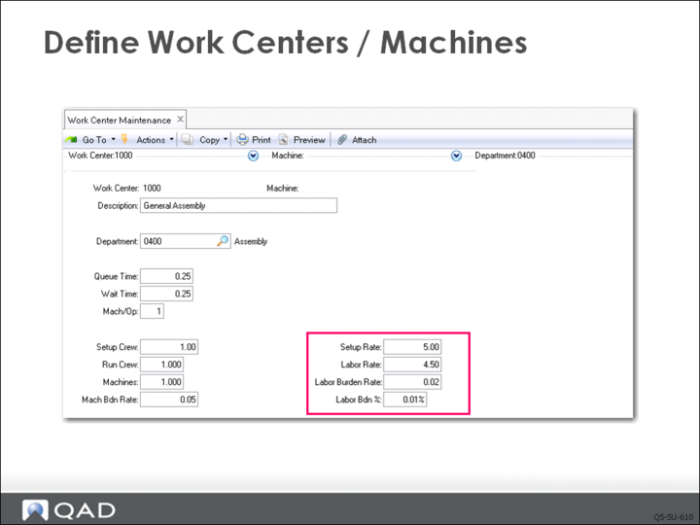
QMI has set up work center 1000 (General Assembly). Because this work center has only one machine (actually just a work bench), QMI does not need to specify a machine in the Machine field so it is left blank. If the work center had two or more machines that could not be used interchangeably, then QMI would need to enter a machine code to specify each machine. If the machines were completely interchangeable, then QMI could leave the machine code blank and put the number of machines in the Machines field.
Notice that this work center belongs to the department 0010, which QMI set up in the previous step.
Machines
If a work area has multiple identical machines, you can define one work center and leave the Machine (code or number) field blank. Enter the number of machines in the Machines field. When a work center has several identical machines, you can specify the number of machines that can be used for each operation (parallel production) in the route operation.
If the machines are not completely interchangeable, identify each one with a distinct code. For example, you have multiple similar machines but they run at different rates. Or perhaps an older machine has a higher rate of rejects. In this case, each machine must have a unique machine code. The combination of the work center and the machine identifies a specific machine.
This example has only one machine per operation and the Machines field shows only one machine in this work center. If two machines were used per operation, then the processing time for an operation that uses that work center/machine combination will be cut in half. Any setup time would be doubled.
Cost Calculations
Important information for cost calculations is the specified in the rate fields. Machine Burden Rate, Setup Rate, Labor Rate, Labor Burden Rate, and Labor Burden Percent all enter into item cost calculations and labor feedback functions to determine actual costs and cost variances.
Additional Notes
In a work center, either the number of machines or the number of people limits capacity. The Machines field contains the number of machines or people. Capacity is then calculated by multiplying total hours (from the work center calendar) by the number of machines.
Field Definitions
Machine Burden Rate
The burden rate per hour applicable to machine run time and setup at this work center.
Setup Rate
The average hourly rate paid to set up this work center.
Labor Rate
The average rate paid per labor hour to run this work center.
Labor Burden Rate
The labor burden rate per hour applicable to both setup and run time at this work center.
Labor Burden Percent
The labor burden percentage applicable to the total labor cost at this work center.