Move Current Cost Set to GL
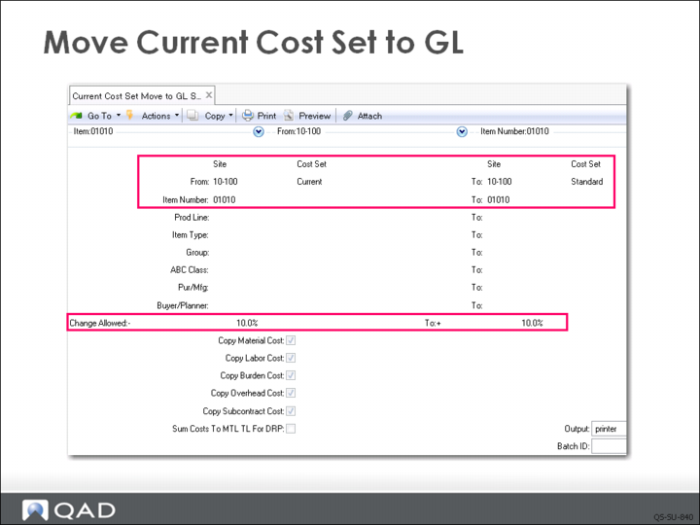
QMI now wants the general ledger to reflect the cost information entered in the current cost set for all of the component items in 01010 at site 10-100, so they are ready to copy and move current costs into the GL using Current Cost Set Move to GL Set (1.4.22).
By leaving the item number selection range blank, all records in the system are selected. This is appropriate since the site only has the five sample items. Note the other selection criteria that could be used. Note also the check boxes for which costs to copy. QMI want s to copy all costs.
Percent Change Allowed
This field restricts the cost movement to items whose GL costs would change only within the indicated range. To accept the movement of all costs regardless of the difference from the previous GL costs, enter all 9’s in the .NET UI interface. (In the terminal view, enter a question mark (?) in this field and its corresponding To field to match all values.)
You can look at the potential consequences before actually moving the current costs to GL costs. To do this, set Pct Change Allowed to 0%. The proposed changes will be displayed on the output device you have chosen, but not copied to the GL costs.
Note: When first establishing costs for new items or in a new system, the present GL cost would be zero. The percent change from nothing to something is mathematically undefined since it would require division by zero.
Current Cost Set Move to GL Set
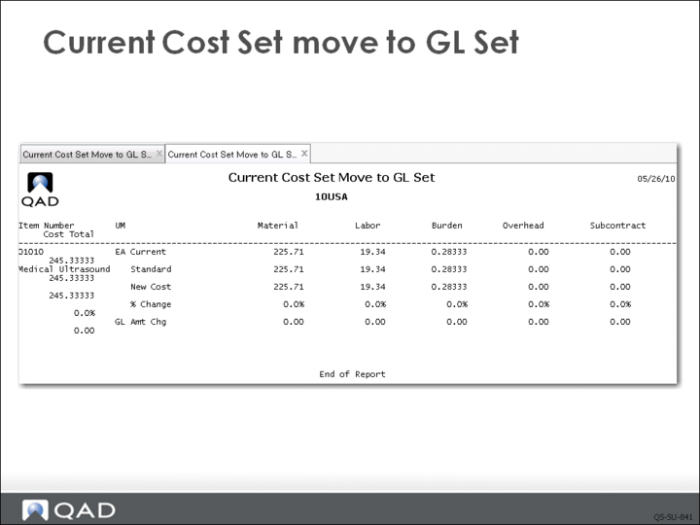
Executing Current Cost Set Move to GL Set (1.4.22) produces a report that can be output to Page and should look like the one shown here.