Requisitions
A requisition is a record stating that an item is needed. Requisitions specify quantity, date needed, and place to be delivered. A requisition is often the first step of a purchase, although you can issue a purchase order without it. Some companies also require multiple approvals before requisitions become orders. Once the requisition’s information is transferred to a purchase order or a blanket order, the requisition is deleted.
Note: QAD EE offers two requisition modules: Purchase Requisitions and Global Requisitions. Both are located in the Purchasing folder under the Supply Chain menu. Global Requisitions offer considerably more functionality (with more complexity). You should have a clear understanding of the differences between the two before making an implementation decision. You can only use one or the other requisition module at a time, and there are consequences associated with changing. This course discusses only Purchase Requisitions.
Note: A separate Global Requisitions course exists and purchase requisitions are covered in more detail in the purchasing course.
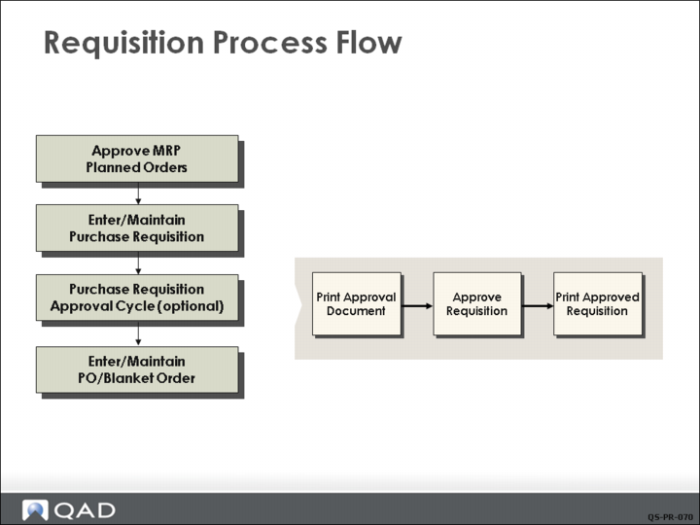
Requisition Process Flow
You can create standard requisitions manually with Purchase Requisition Maintenance or by approving an MRP planned order with Planned Purchase Order Approval. The system refers to requisitions by requisition number.
Approval Process
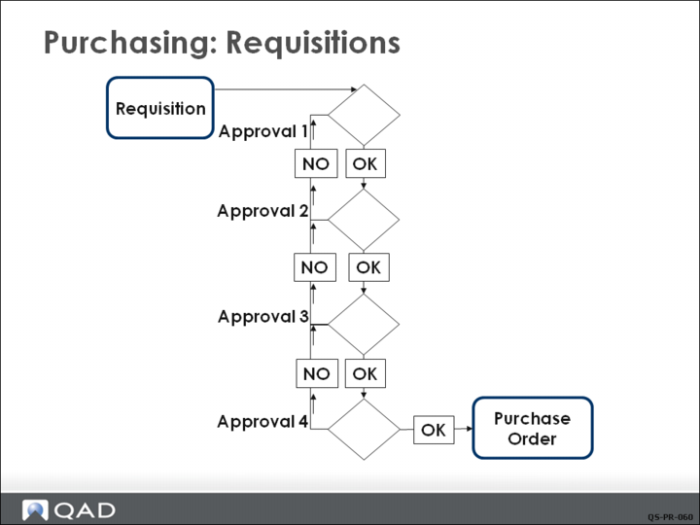
Companies using requisitions may choose to go through a requisition approval process. Approval levels can be defined to establish approval requirements by product line, site, requested by, and purchase expense account. Then, whenever a requisition is created, it is automatically assigned an approval code. This determines the approval level based on the requisition cost. The approval level indicates the person who must sign off on the requisition before the item can be purchased. Multiple approval levels can be recorded for each requisition.
A $50,000 purchase may need regional manager approval, but the purchasing manager and division manager must sign off first before it is sent to the regional manager.
Printed Requisitions
Requisition documents can be printed for each item, listing the approved requisitions for that item with the quantity and due date.
Supplier-item quotes can be printed on the requisition document. These are similar to manual “buy cards” (used in many purchasing departments) because they list the supplier options.