Key Concepts
Manufacturing Overview
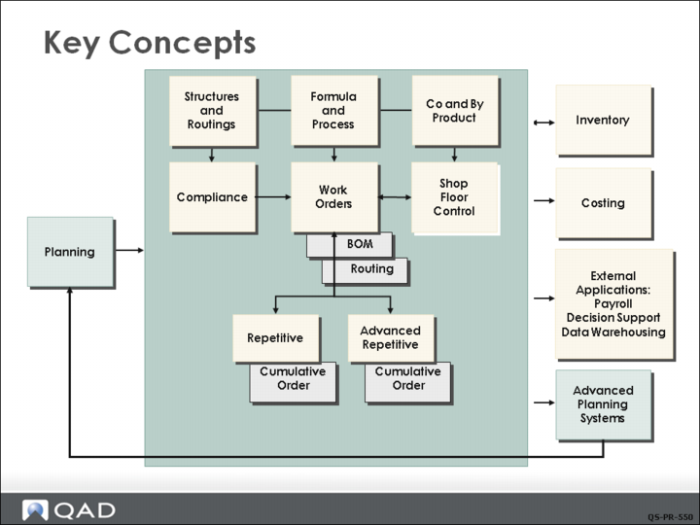
QAD EE manufacturing modules handle internal supply and demand. Material is moved out of inventory into production, processed or assembled, and returned to an inventory location. At the center of much of this activity is the Work Orders module, as shown in the slide. In the process of using work orders you:
• Define bills of material and product structures in the Product Structures module.
• Define routings and operations in the Routings/Work Centers module.
• Create planned orders to fill demand with Material Requirements Planning.
• Monitor and report on the progress of work orders in the Shop Floor Control module.
Manufacturing Environments
QAD EE provides features that support different manufacturing environments.
The Work Orders and Shop Floor Control modules are typically used to manage job shop type manufacturing and low to intermediate volume mixed product manufacturing. The Advanced Repetitive or Repetitive modules manage manufacturing in an assembly line or process flow environment.
Formula and Process routings and structures are used to support formula or recipe based processes and these can also utilize co-product and by-product structures to facilitate disassembly processes or processes that create a main product and related products. The Lean Manufacturing module provides support for Kanban and Flow manufacturing. These advanced functions are covered in detail in their own training materials and are not covered in this course.
This class focuses on discrete work orders created in the Work Orders module. Understanding the concepts behind work orders is critical to understanding any of the other manufacturing processes.