Create Work Order
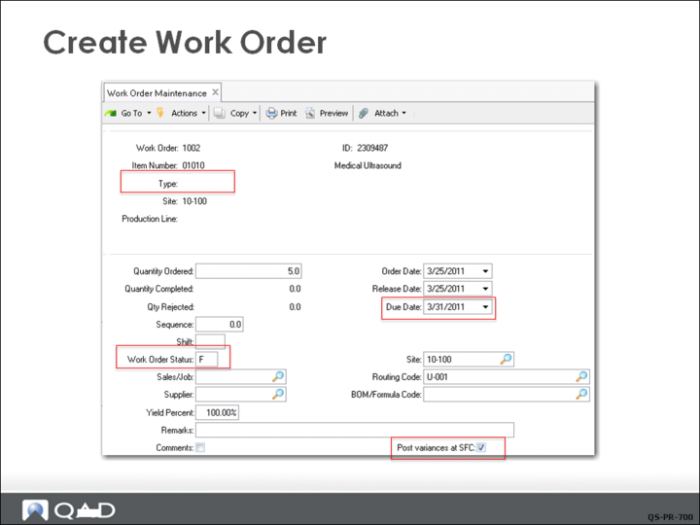
In Work Order Maintenance (16.1), notice that the WO number is based on the Work Order Control setting. Post Variances at SFC has a check mark, based on the setting in Work Order Accounting Control (36.9.11). When checked, variances are posted when shop floor transactions are processed rather than when Work Order Accounting Close is run.
Type
The work order type is blank, which means that this is a normal manufacturing order with a standard product structure and routing.
Work Order Status
This work order has a status of F (Firm Planned), so this order has been reviewed and confirmed, or manually created.
Due Date
The order date and the release date default to the system date (today). The system has calculated the due date based on the lead time calculated from the standard times in the routing, multiplied by the order quantity. If you leave Release Date blank and enter a due date, the system calculates the release date.
Routing Code
The routing U-001 has been specified. This code was defined in Routing Maintenance. If an alternate route is needed for this work order, specify it here.
BOM/Formula Code
The BOM field is blank, so the system accesses the BOM code that matches the item number on the work order. The BOM code was defined in Product Structure Maintenance. If an alternate bill is needed for this work order, specify it here.
Several additional frames display when you click Next, used for special cases beyond the scope of this course. Accept the defaults and continue to click Next until the cursor returns to the first field.