Release Work Order
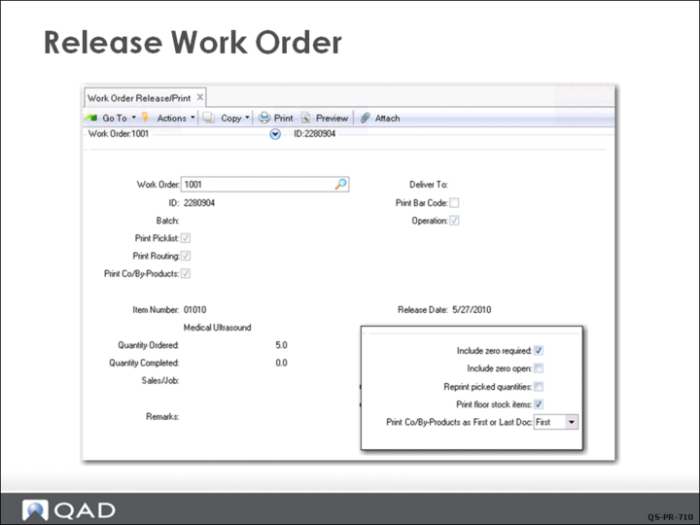
Using Work Order Release/Print (16.6), QMI’s Production Manager releases the work order for 5 medical ultrasound units. Based on the selections above, a picklist of required component items and a route sheet listing operations are printed. If you have a printer, you can direct the output to the printer and get a hard copy of the picklist and routing sheet. Otherwise, direct the output to Page to view the picklist and routing on you monitor.
The secondary pop-up window shown here is used in special case situations. Accept the defaults and click Next to complete the request.
Once all entries in the Work Order Release/Print screen have been completed, the status of the order changes from F (firm planned) to R (released). During this process the work order has been exploded and allocated, then released in one step.
The release function generates a document with two parts that can be printed or viewed on your monitor:
• A picklist for selecting component items from inventory
• A routing sheet listing the operations and work centers
Review Picklist
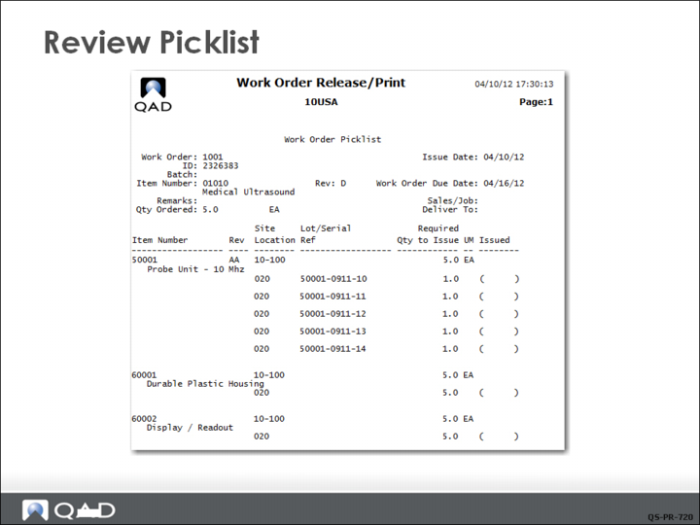
The printed picklist lists the medical ultrasound component items, the quantities to issue and the site (10-100) and location (020) to pick from. Note the parentheses, which can be used by the issuing stock clerk to initial the picklist to indicate which items have been issued.
Review Routing
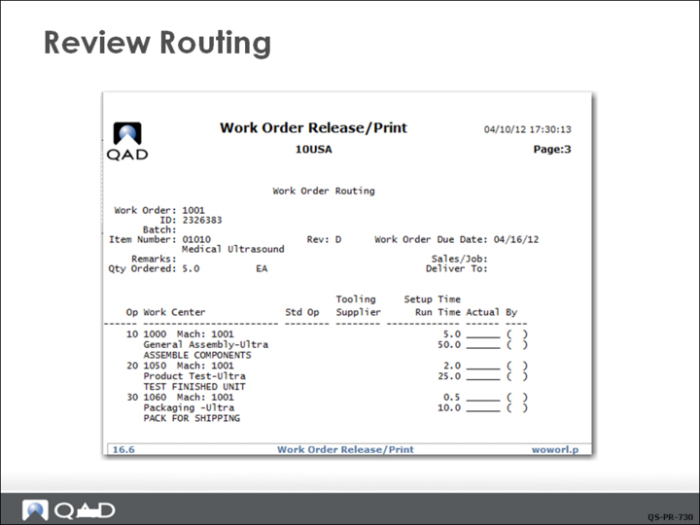
The printed routing sheet lists the operations 10-20-30, and standard setup and run times to manufacture 5 units. The route specifies which work center the work should be done in and the short description of the task.