Print Sales Order Packing List
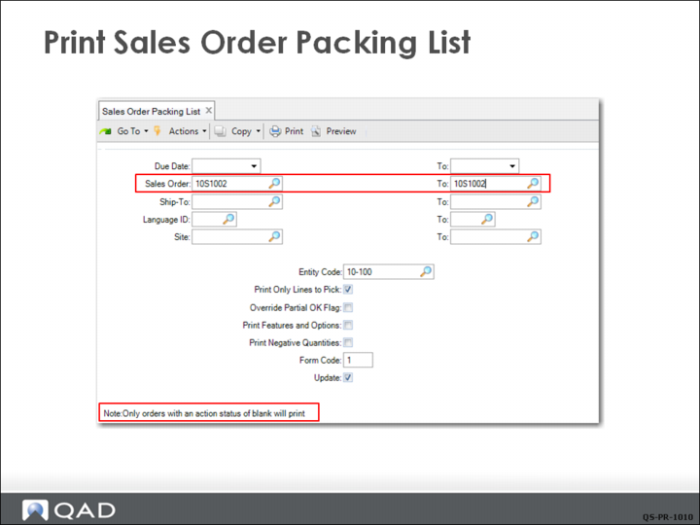
To print the packing list, the CSR uses Sales Order Packing List (7.9.13).
Note: QAD EE uses the terms packing list and picklist interchangeably.
The shipping clerk can use the picklist to pick the items from inventory for shipment and can then be included with the shipment as a packing list. Alternatively, two copies of the packing list can be used if you need to keep a hard copy for internal purposes.
Because the CSR has selected Update, after printing the picklist, the system updates the values displayed in Sales Order Maintenance for the quantity allocated and quantity picked.
Set Update to No to print a simulated picklist for review without updating the sales order record.
Sales Order Packing List Print
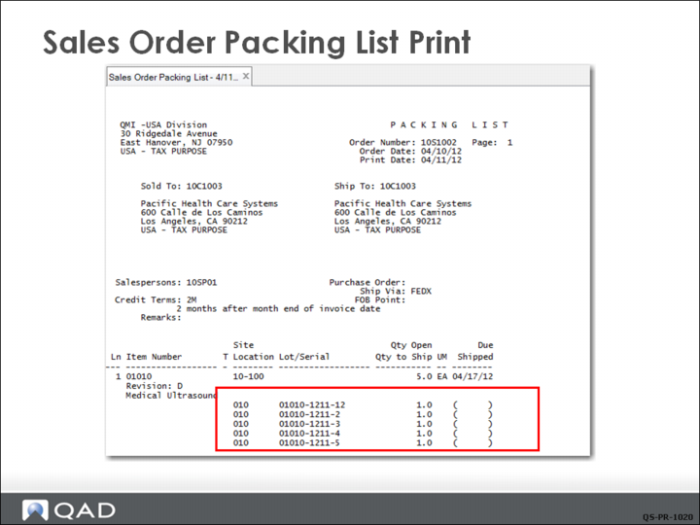
The picklist shows what items to pick to fill an order and what site or location to pick them from.
• If you created detailed allocations in Sales Order Maintenance—including lot/serial numbers and lot reference numbers—this information appears on the picklist.
• If you performed a general allocation for the sales order, the system automatically converts the general allocation to a detail allocation when it prints the picklist.