Invoice Post and Print
The company’s customer service supervisor or Accounts Receivable (AR) administrator uses Invoice Post and Print (7.13.4) to produce an actual invoice from the pending invoice and post the transaction to the general ledger. The invoice number is assigned by the print function. T
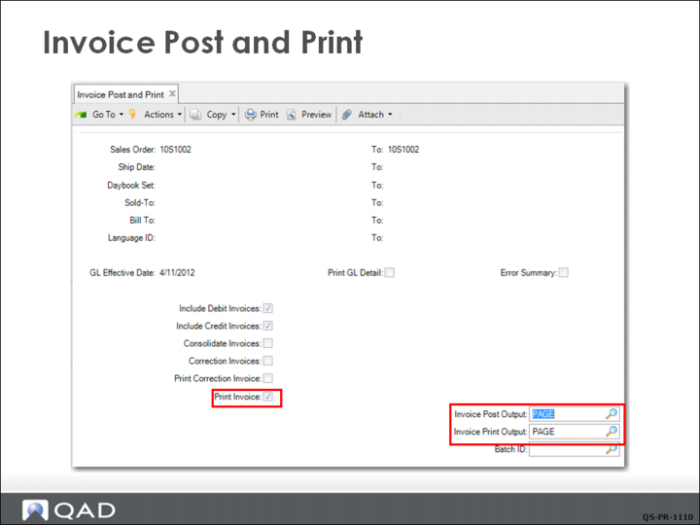
he first frame of the selection screen lets you select sales orders by the usual range of values. Be sure to check the Print Invoice box when you are ready to print hard-copy invoices. Several other frames display additional print options.
Notice the two printer choices for the two types of output from this function:
• The invoice post output is a report that could be sent to a printer with normal paper in the AR department.
• The invoice print output (the actual invoices) could be sent to a printer with letterhead or preprinted invoice paper.
You can also choose Page to direct the output to your monitor.
Invoice Post and Print Sample
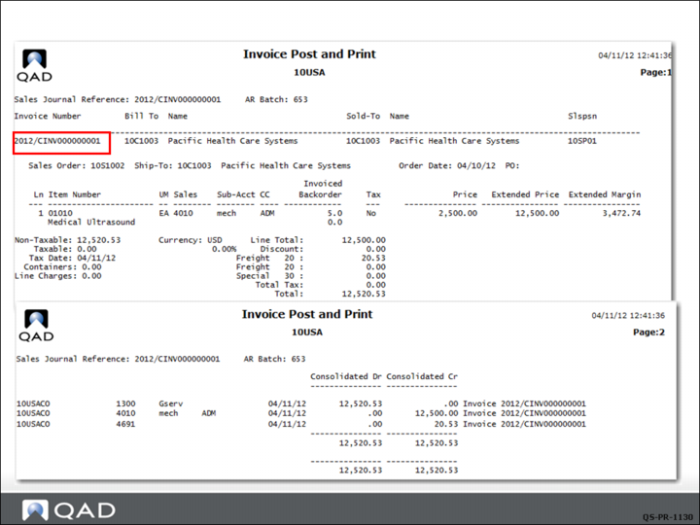
The output of the invoice post transaction is shown here. Note the invoice number has now been assigned by the system based on criteria set up in the finance system.
The other details in this output are the same as those displayed in the pending invoice register.
If you print the invoice, it will look the same as the draft invoice seen earlier, but with the invoice number added.