Planning
>
Master Schedule Summary: Item 01010
Master Schedule Summary: Item 01010
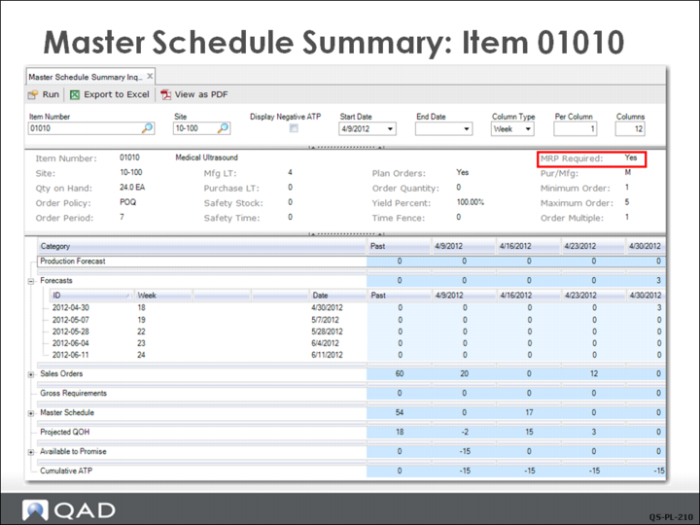
Master Schedule Summary Inquiry (22.18) shows the QMI master scheduler the planning data for the item at this site, such as lead times, order policy, order period, order quantity, whether the item is purchased or manufactured, and the current quantity on hand. Most importantly, though, this screen shows a summary of the master schedule demands for an item. This example shows item 01010 and the current plan to satisfy its demand.
The net forecast is provided in the Forecast row, and the total of the sales order quantities are shown in the Sales Orders row. Each row can be expended to show the details by clicking on the + sign on the right. The report can also be sent to Excel for further ease of data manipulation.
The Projected QOH (quantity on hand) is the calculated on-hand balance at the end of each period. In this example, there are 18 units in stock or on hand from past production, so demand in the first week makes the Projected QOH number negative. In week beginning 4/9, the sales order demand for 20 means that the Projected QOH is -2 (QOH - demand; 18- 20= -2).
The real key to this screen is the MRP Required field, highlighted in red, which is checked. This simply means something has changed since MRP was last run and that the displayed data is no longer accurate. MRP must be run again.
In this example, there is no inventory Available to Promise.
You will see the effect of running MRP when the QMI planner runs MRP later in this example.
Master Schedule Summary Inquiry
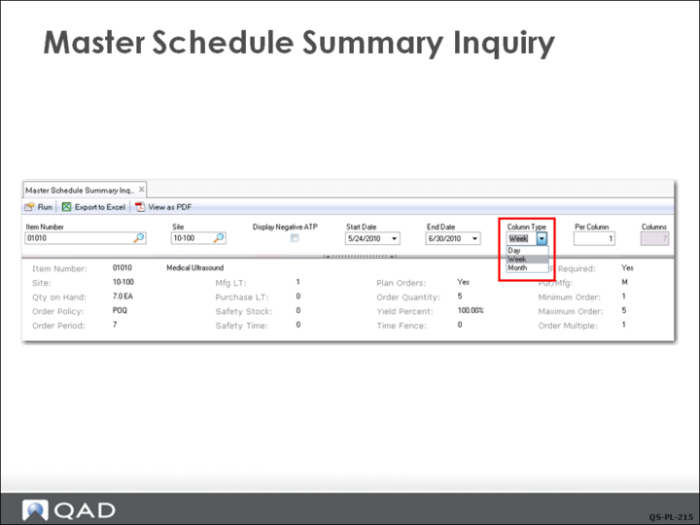
In Master Schedule Summary Inquiry (22.18), the display defaults to a period length of a week. In the input selection frame, you can select period lengths of days (D), weeks (W), or months (M).
You can also display multiple periods in each column by putting a number in the Per Column field. Specify a start date and end date to look at specific ranges of data.
For example, if your business worked 4, ten-hour days per week you might choose to make the period Days and display 4 periods per column.