Running MRP
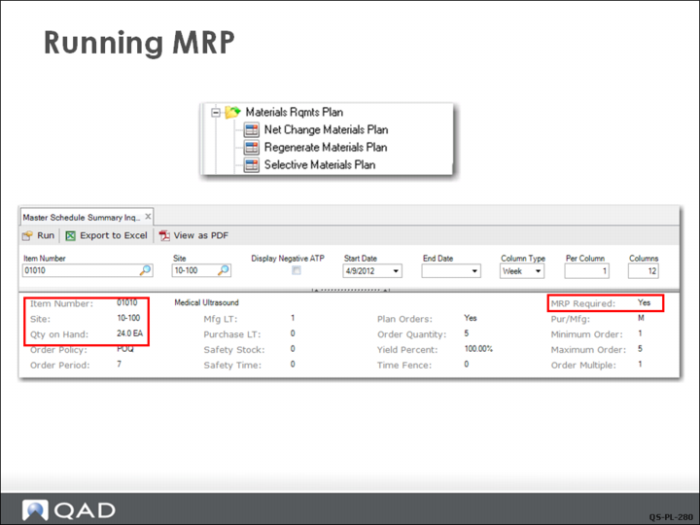
The menu at the top of this slide shows the three ways to run MRP.
Net Change Materials Plan
The normal method used on a routine daily or weekly basis is net change MRP (23.1), which selects all the items at a site with the MRP Required field set to Yes. The value of this field can be viewed in Master Schedule Summary Inquiry (22.18), as seen here.
When Regenerate Materials Plan (23.2) is first run, MRP Required is set to No for all items. In the normal course of business, almost any transaction for an item resets this field, indicating that MRP should be run again to recalculate the demand and supply for the item. Issues and receipts are obvious changes in inventory. Less obvious are changes in forecast or safety stock, or changes in item planning data, these also reset the field to Yes.
Regenerate Materials Plan
Regenerate MRP runs against all items at a site and may take much longer than net change MRP, depending on how many inactive or obsolete items you have. This is the method often used when running MRP for the first time.
For both net change and regenerate, the only user selection is the site or range of sites. MRP is always calculated by site. If you have several sites in your database and run MRP for all the sites, each site has its own MRP output, completely separate from the others.
Selective MRP
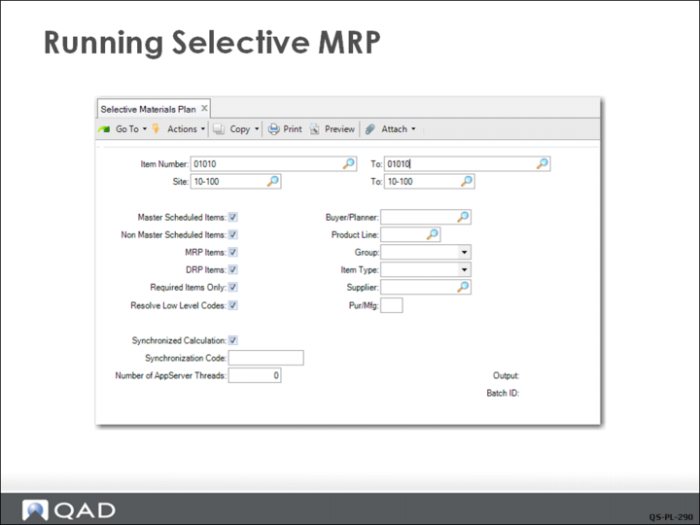
Selective Materials Plan (23.3) lets the planner select specific items or groups or ranges of items. As can be seen in the selection screen above, there are many ways to limit the number of items that will be processed by this MRP method. While this is a powerful planning tool, you should remembered that items excluded from the process may have an impact on items included in the process.