The Installed Base and Service Policy
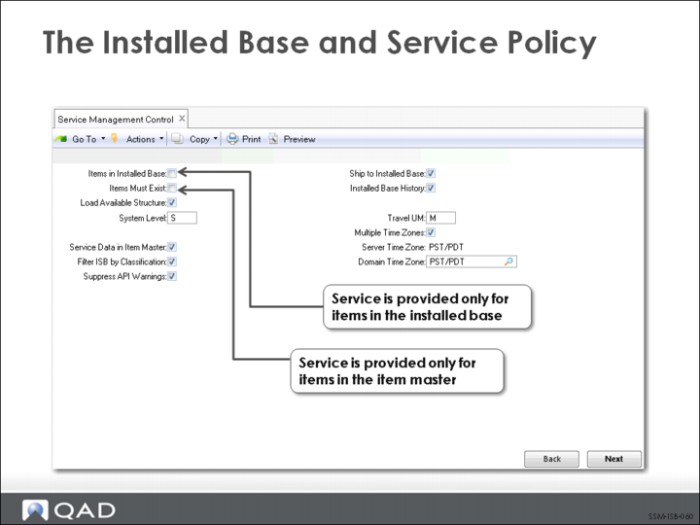
Key business decisions controlling the service activity are set in Service Management Control (11.24). Should you take calls for items only in your item master or installed base? Will you load parents and their components into the ISB after the sales order shipment/invoice post? Do you utilize multiple time zones in managing service?
If you want to use the installed base as a validation database, you should set Items in Installed Base to Yes. When set to Yes, no service quotes, contracts, call quotes, or calls can be created referencing an item not in the installed base. When set to No, only a warning message is displayed in these functions.
The setting for the Items Must Exist field in Service Management Control determines whether the installed base is restricted to inventory items. Setting Items Must Exist to No lets service personnel take calls for items that are not defined in your item master. This is important if you service items that you do not manufacture and sell.
Load Available Structure only has an effect if certain other conditions are also true:
• The item must be one you manufacture or configure since the system uses transaction history records to determine the components.
• The parent and each component to be added to the installed base must also be defined as a service item with Service Item Maintenance and the Installed Base field set to Yes.
• Manufactured items must be serial number controlled and created with a work order quantity of 1 to allow unique identification.
• The shipment quantity for configured items must be 1.