Call Default Mechanics
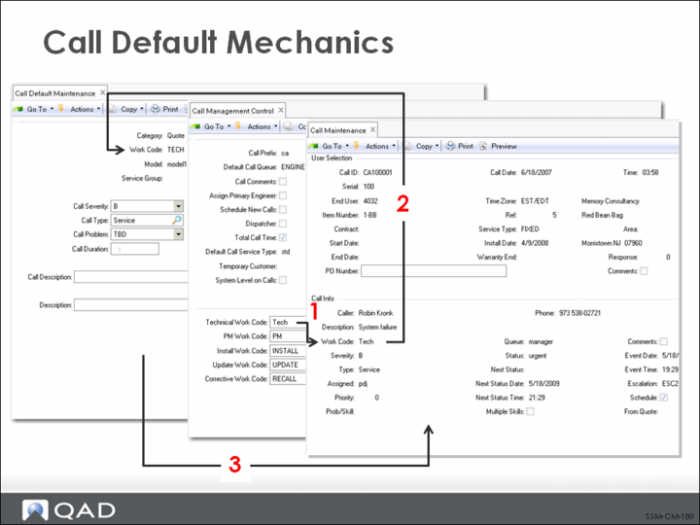
When a call is created in Call Maintenance, the system follows a number of steps to determine appropriate defaults.
1 First it checks Call Management Control for the value of the Technical Work Code.
This value then displays by default in the Work Code field of the call defaults pop-up window, and can be changed if needed.
2 Using the work code specified in the pop-up, the system searches for defaults set up in Call Default Maintenance with a Category of Call and the specified work code.
3 If they are found, the values specified for call severity, type, problem, duration, status, next status, queue, escalation, and description are brought into the call record and display in the appropriate Call Maintenance fields.
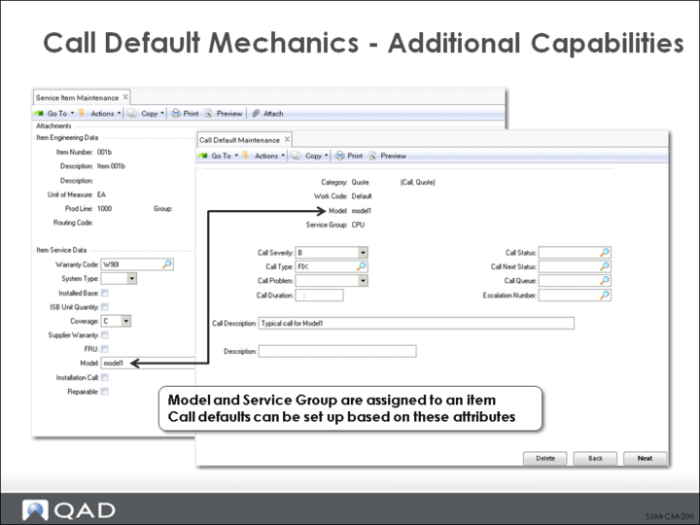
Model
The model number associated with this item. Many organizations service products by model. Associating a model number with a set of items enables you to create call defaults based on the model in Call Default Maintenance (11.1.21.10). This is useful if calls associated with various product models follow different paths.
Service Group
An optional code that can be set up in Generalized Codes Maintenance for field pt_svc_group to group types of service costs in any user-defined manner. Service group can be used as part of the key in setting up call defaults, as well as a number of other call-related codes like prices, sites, and product lines.