Call Maintenance (11.1.1.1)
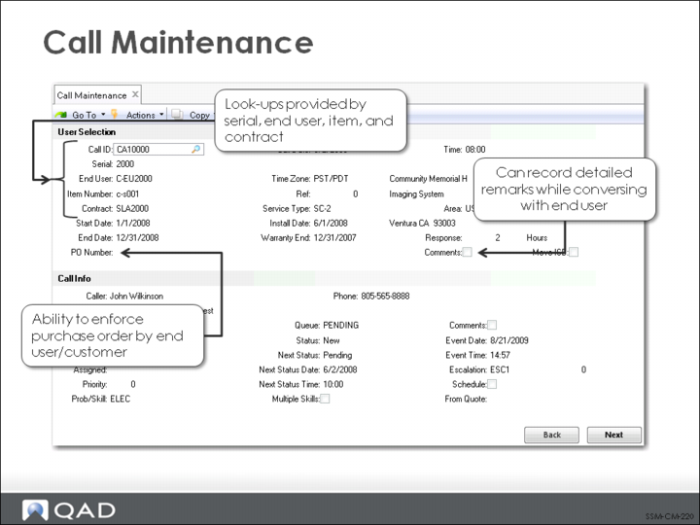
Call Maintenance (11.1.1.1) is designed to simplify call entry since it is often used in an on-line environment where information is entered on the screen directly as support personnel interact with end users. Some of the features that facilitate data entry include:
• Flexible lookups by:
• Serial number
• Items in the installed base
• Contract number
• End user
• The ability to create end users from this screen without having to take the time to add a detailed record in End User Address Maintenance.
• Coverage detail is retrieved from the item’s warranty or the active service contract. Otherwise, the default service type defined in Call Management Control is used.
• If the end user calling has been set up to require a purchase order for service, it can be entered on the first frame-preventing wasting time on calls that cannot be serviced.
• Call comments can be entered from the first frame, enabling service personnel to record details immediately, and then make decisions about other fields later.
Call Maintenance - Multi Items
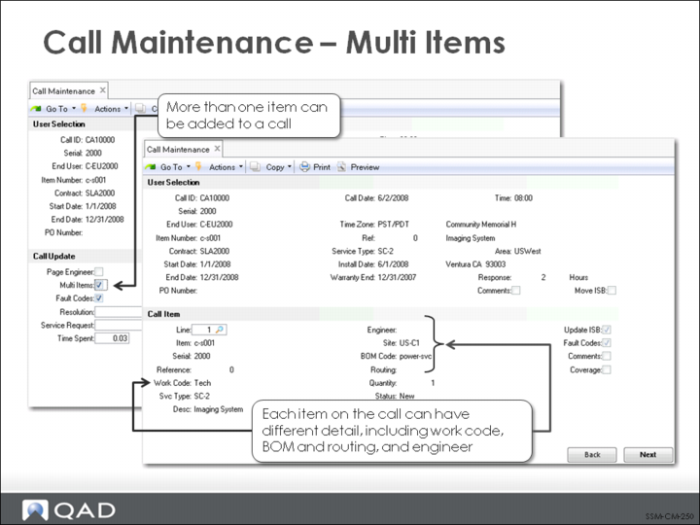
More than one item can be added to a call. To add more items or view details for the first item, set Multi Items to Yes in the Call Update frame. In this case, the Call Item frame displays.Distinct details for each item on a call may be recorded in the Call Item frame. Each item may have its own engineer, work code, BOM, and routing.
Note: There will be only one set of key call tracking codes per call.