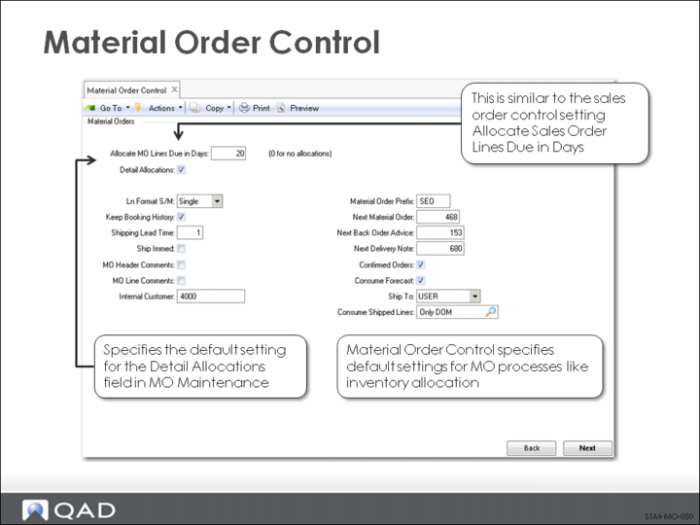
Material Order Control (11.11.24)
Material Order Control enables you to tailor various aspects of MO processing. Some of the fields are similar to fields in Sales Order Control, since MOs and sales orders share similar functionality.
Allocate MO Lines Due in Days
Specifies the number of days into the future that MOs should be allocated. For example, if Allocate Days is set to 5 and the due date on an MO is 4 days in the future, a general allocation is performed. This setting has an impact when the MO is created and when performing MO Automatic Allocations (11.11.5).
Detail Allocations
Specifies whether detail allocations are usually made during MO entry. Detail allocations function to assign specific inventory lot/serial numbers and locations to be shipped on an MO. Enter Yes if detail allocations are made during MO Maintenance. Enter No if detail allocations are not normally entered on the MO. The default value displays and can be changed on each MO line item.
Keep Booking History
Indicates whether booking history is maintained. If Yes, the system keeps an audit trail of all incoming MOs, including new orders added or existing orders changed. A record is kept in transaction history and identified as type ORD-SO with the item, order quantity, price, cost, date, user ID, and other information. You can review this information using booking inquiries and reports. Detailed transaction history can also be reviewed using Transaction Detail Inquiry.
Shipping Lead Time
The usual number of calendar days elapsing between the date an MO is entered and when the items are shipped to the destination. (If orders are shipped immediately, this can be left as zero.) The default required and due dates on an MO derive from shipping lead time. When you first enter an MO, the required and due dates are set to the system date plus the shipping lead time, indicating the normal delivery date. You can change this date if necessary.
Ship Immediately
If Yes, a screen appears when you leave line entry that enables you to initiate the shipment process from within MO Maintenance. If Ship Immediately is No, you are finished with the material order when you accept your input.
Material Order Prefix and Next Material Order
Used together to determine the next MO number for numbers automatically generated by the system. The prefix is optional. The MO number is incremented by the system each time an MO is entered.
Next Back Order Advice and Next Delivery Note
Number used by the system when documents are created during MO shipments and automatically incremented by the system.
Confirmed Orders
Indicates whether MOs are normally entered as confirmed and determines the default in MO Maintenance. If orders are entered unconfirmed, a separate MO confirmation step must be executed before shipment.
Consume Forecast
Determines the default in the Consume Fcst field in MO Maintenance. If Yes, MO items consume forecast the same way that sales order lines do. If you do not forecast parts used for repair and service, this field is generally set to No.
Ship To (End User/Engineer)
The value of this field determines the value for the Ship-To on a new MO associated with a call. When set to end user, Ship-To defaults to the user who called. When set to Engineer, it defaults to the address of the engineer assigned to the call.
Consume Shipped Lines
Set this field to control the consumption of items.
Yes. Enables the automatic MO shipment/CAR consumption for all material orders. This is the default setting.
Only DOM. Enables the automatic MO shipment/CAR consumption for depot material orders only (that is, for orders associated with calls that have a work code with Repair Center set to Yes).
No. Do not auto-consume items. Instead, use the standard MO shipment/CAR consumption.