RMA Billing
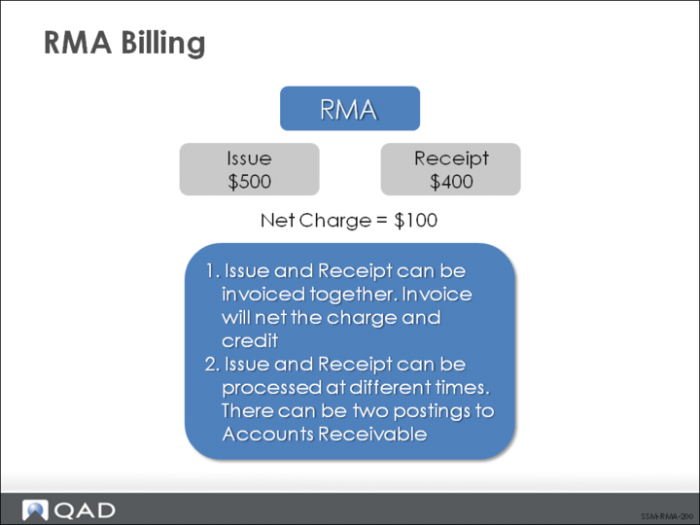
RMA issues and receipts can be invoiced together. RMA issues can create an invoice charged to the bill-to address. RMA receipts can create a credit, as well as a billable amount if a restocking charge exists. When an RMA includes both issues and receipts, the net amount is charged.
Example: An RMA issue is charged $500 and a receipt credited $400. When this RMA is processed and invoiced, the resulting net charge is $100. The RMA lists the line items and shows a $500 charge for line item one and a credit price of $400 for line item two, with a net price of $100.
The issue and receipt can also be processed separately at two different times. In this case, there are two postings to Accounts Receivable, one for $500 and a credit for $400. The net result is an invoice for $100 US.
Billing RMA Issues
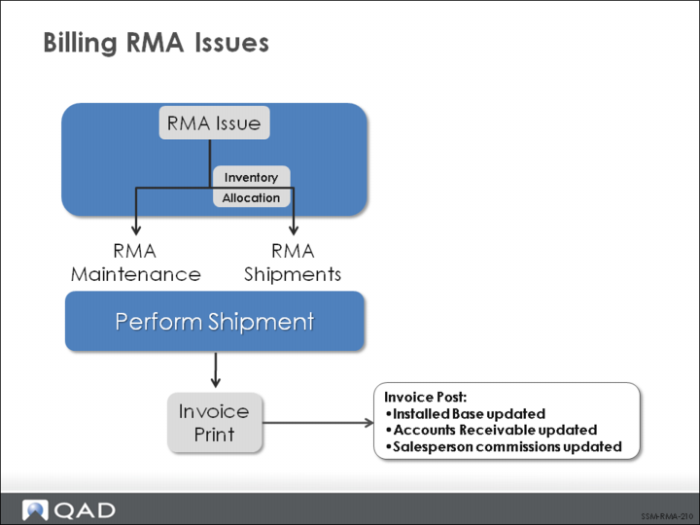
An RMA issue typically follows these steps to create an invoice:
1 Create an RMA issue line.
2 Ship the line item, either directly from RMA Maintenance or using RMA Shipments (11.7.1.16).
3 Post and print the invoice using Invoice Post and Print (7.13.4).
Once the item on an RMA issue has shipped, you must print an invoice in order to get an invoice number for the RMA sales order. Printing automatically assigns the number. It is also possible to manually assign an invoice number to the RMA in the RMA header. The Ready to Invoice line must be set to Yes in order for an RMA to be processed to the next step. Either way, an invoice number is assigned to the RMA before it is posted to the general ledger.
Posting the invoice updates the installed base (if needed), accounts receivable, and salesperson commissions. Once an amount to invoice exists on an RMA, pricing data can only be updated with Pending Invoice Maintenance (7.13.1).
Billing RMA Receipts
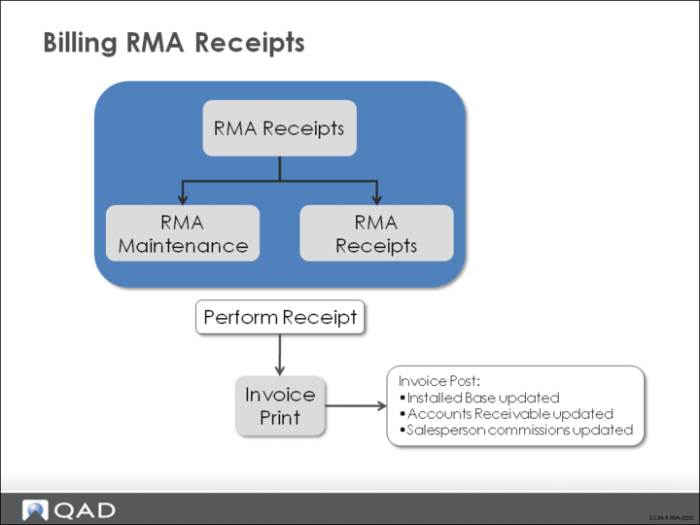
An RMA receipt typically follows these steps to generate an invoice.
1 Create an RMA receipt line.
2 Receive the line item, either directly from RMA Maintenance or using RMA Receipts (11.7.1.13).
3 Post and print the invoice using Invoice Post and Print (7.13.4).
Once the item on an RMA receipt line has been received, the invoice can be printed and posted just as for RMA shipments. Posting the invoice updates the installed base (if needed), accounts receivable, and salesperson commissions.