Removing Boxes from Containers
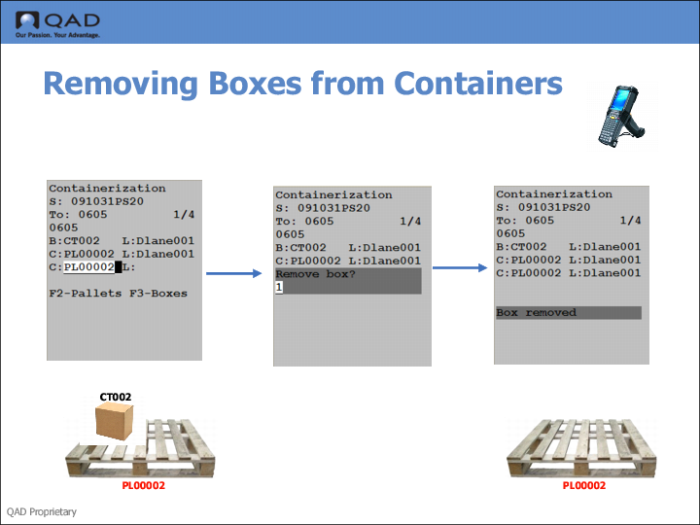
You remove boxes and containers using the RF Container Build (3.3) menu option. To delete a box, warehouse staff scan the box and its container. The system knows the pallet for the box and understands this action is to remove the box from the pallet, so it prompts you to remove the box.
When staff respond with a Yes, and remove one box from a pallet, the system displays the message:
Box Removed
If staff remove all boxes from a pallet container, the pallet container is removed, too, so the pallet container level does not display under the shipper ID on the RF device.
If you remove boxes and the container at the next level up is empty, the system deletes the empty container.
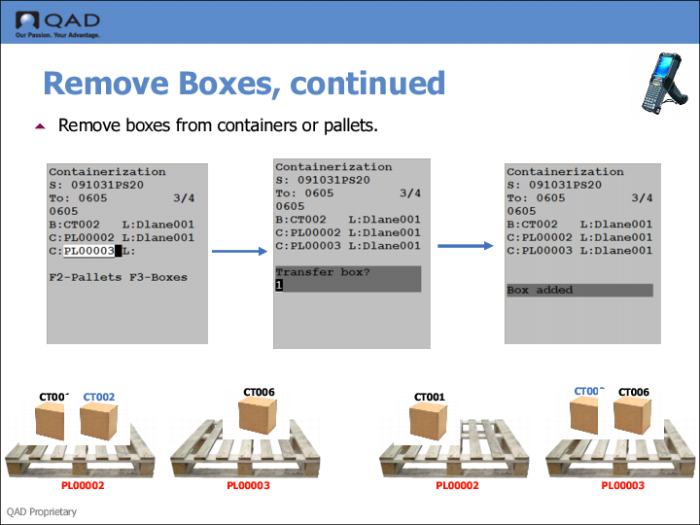
When staff scan in another container, the system understands that the intent is to transfer the box to the other container, and prompts staff to transfer the box, as shown in the following graphic.