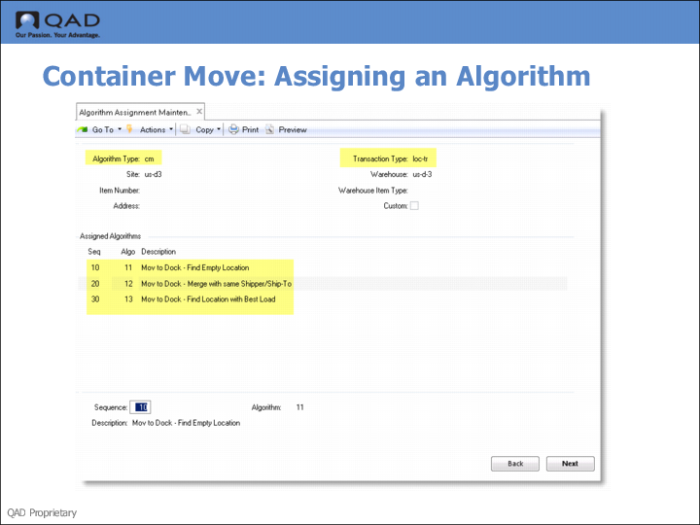
Assign an Algorithm to the Transaction Type
Use Algorithm Assignment Maintenance to assign a container move algorithm to the transaction type you previously created.
Fields
Algorithm Type
Use Algorithm Type to specify the two-character code for the type of algorithm you want to maintain or assign. The standard two-character codes are CM, LA, LF, PA, PK, QA, and SC.
These standard codes are supplied with the system, and you will not normally need any other algorithm types. If you should ever need to add another algorithm type code, you must create it, and its description using Generalized Code Maintenance.
Transaction Type
This field is used to specify the transaction type.
Maintain transaction types using Transaction Type Maintenance.
You specify the transaction type to link to an internal routing in Internal Routing Assignment Maintenance. You specify the transaction type to link to a sequence of algorithms in Algorithm Assignment Maintenance.
You also specify the transaction type when using the Algorithm Simulation Menu. These options simulate either location-find and put-away, or picking. The system simulates the running of the algorithms that you have assigned to the specified transaction type and displays the results of the simulated put-away or picking.
Sequence
Each algorithm assignment consists of a number of individual algorithms, in order, identified by a sequence number.
For a new assignment, Sequence defaults to 10. Number sequences by 10's (10, 20, 30, and so on) so that additional steps can be inserted easily later, if required.
Algorithm
Assign algorithms of the type you selected at the top of the frame. You can either type in the required number, or you can use the Up and Down arrow keys to move through the list of algorithms.
Use Algorithm Master Maintenance to modify the description of the algorithm you select.
In Algorithm Assignment Maintenance, you can assign algorithms of the type you selected at the top of the screen. For example, if you selected algorithm type PA, you can assign any of the put-away algorithms.