Assigning Algorithms to Transactions
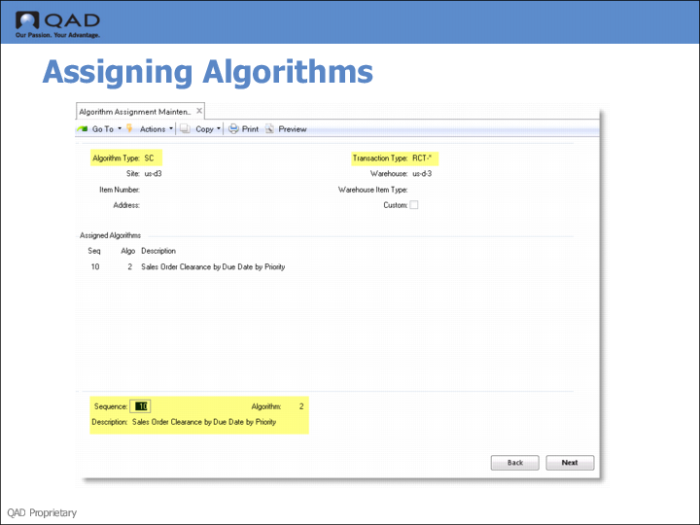
Use Algorithm Assignment Maintenance (4.6.9) to assign algorithms to transactions that the system uses in cross docking.
The reason for setting up a sequence of algorithms is so that you can specify the ideal method for selecting locations as the first step in the sequence. If the system cannot meet the full requirements either of put-away or picking by running the first choice algorithm, it then runs the second algorithm in the sequence, and so on until the requirement has been met.
Algorithm Type | Transaction Type | Additional Fields |
SC (shortage clearance) | RCT-* | Sequence=10
Description=Sales order clearance by due date by priority
Algorithm=2 |
PK | SHRT-SO | Sequence=10
Description= Pick by location
Algorithm=3 |
LF | SHRT-SO | Sequence=10
Description=Merge with same order
Algorithm=3 Sequence=20
Description=First location in first storage location group
Algorithm=1 |
Fields
Algorithm Type
Enter the two-character code for the type of algorithm you want to assign. The standard codes are LF, PA, PK, SC and QA.
Transaction Type
Enter the transaction type to which you want to assign algorithms. You can use an asterisk as a wild card if you want to assign the same algorithm to a range of transaction types.
Example: The transaction type RCT-* covers all receipt transaction types, such as RCT-PO, RCT-UNP, RCT-WO, and so on.
Sequence
For a new assignment, Sequence defaults to 10. Number sequences by 10’s (10, 20, 30, and so on) so that additional steps can be inserted easily later, if required.
Algorithm
Assign algorithms of the type you selected at the top of the frame.