Exercise - Add More Items and Create UM Groups
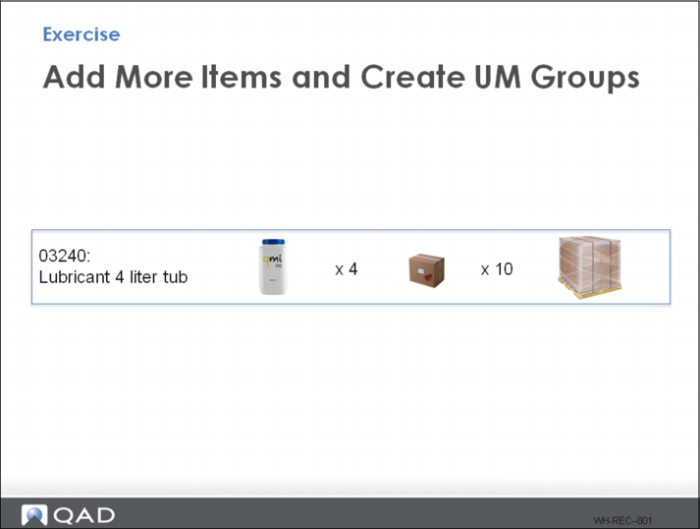
Management identified a new item 03240 to add to the warehouse inventory
1 Set up a new unit of measure group for the above conversions, using UM Group Maintenance.
Field | Data to Enter |
Unit of Measure Group | |
UM | EA |
Alt UM | BX |
Conversion (How many eaches fit in a box.) | |
Alt UM | PL |
Conversion (How many eaches fit on a pallet). | |
2 Assign the new item to the warehouse.
a See Item Master Maintenance exercise above.
b See Multi-Level Item Maintenance exercise above.
Assign the new UM Group to the new item using Multi-level Item Maintenance. For efficiency, you can also use Item Maintenance to make this change.
.
Field | Data to Enter |
Item Number | 03240 |
Unit of Measure Group | |
3 Run UM Conversion Generation to apply the new UM Group:
Field | Data to Enter |
UM Group | |
Confirm three boxes in lower frame are checked. |
The UM Conversion Generation report displays the UM changes made. If the report is blank, the UM Conversion did not occur.
4 Use Receipts-Unplanned to receive: 120 EA, item 03240
What loads are created and which locations are selected for item put-away? (View Inventory Detail Inquiry.)
When done properly, three pallets with 40 each are created and put-away to the next empty pallet location
5 Use Location Full% Report to check the warehouse 02 space utilization. Relative Full% = 28.13, Absolute Full% = 50.00.
Question: What loads are created and which locations are selected for item put-away? (View Inventory Detail Inquiry.)
When done properly, the system creates three pallets with 40 each.
6 Use Movement Confirmation Workbench to complete all moves.
Question: What is the warehouse space utilization? (Use Location Full% Report.)
Relative full = 18.75%
Absolute full = 33.33%