Example - Confirm Inspection Results
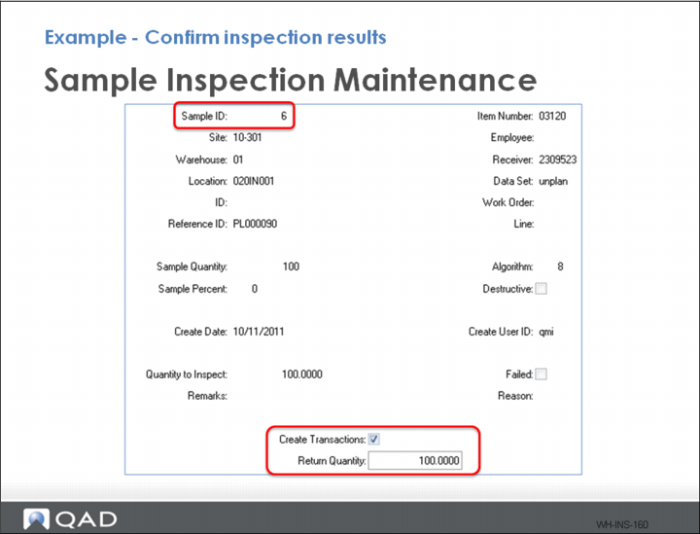
Use Sample Inspection Maintenance in QAD Warehousing to confirm inspection of one line item at a time. To do this:
1 Select the Sample ID.
2 Click twice to get to the Create Transactions and Return Quantity fields.
3 Ensure the Create Transactions field is checked and the successful inspection quantity is entered.
4 Click Next.
Example - Confirm Inspection Results (Continued)
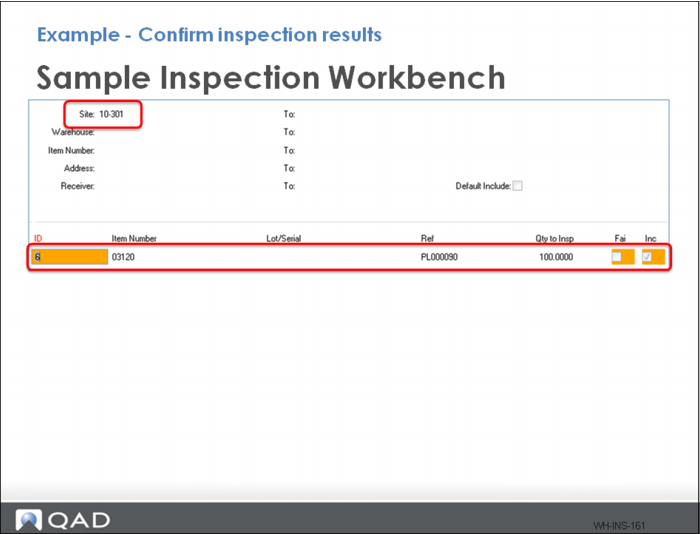
Alternatively, you can use Sample Inspection Workbench to approve multiple inspection samples and trigger a BACK put-away transaction.
Select the line to accept and click anywhere in the line item frame. This enables the Inc field. To change the quantity or add a remark, right click anywhere in the above frame to open a drop down menu.