Executing Labor Tracking (continued)
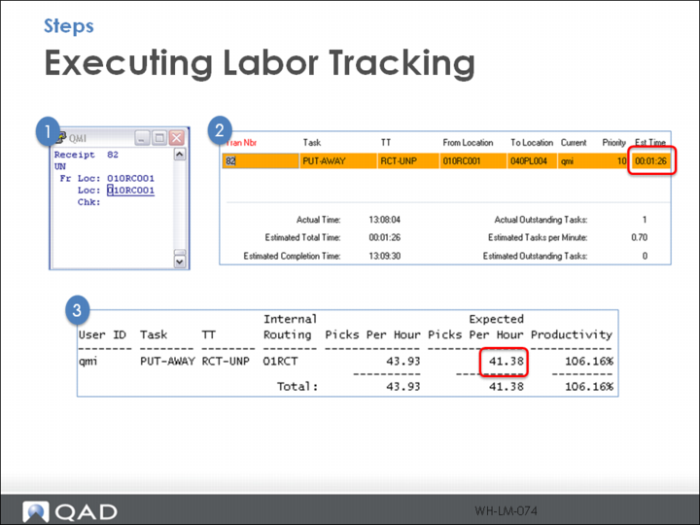
When you receive another pallet of 03210 and the task (82) is accepted by RF user QMI:
1 Labor Management Workbench shows the task assigned to qmi and the NEW Est Time (1.26) to complete the task. Note, the Est Time conversions are slightly off—should be 1:27 = 87”
Also note the Expected Picks Per Hour column is updated to reflect the updated Task Time Maintenance: 87 seconds. (3600 seconds per hour / 87 seconds per task = 41.38 tasks per hour). The system only updates the column when you run Task Time update, while the Picks Per Hour column is updated each time a task is complete.
Running Task Time Update updates the Estimated Time in Task Time Maintenance. Be judicious and have a plan/reason for running this update.