Setting Up Generic Coverage Factors
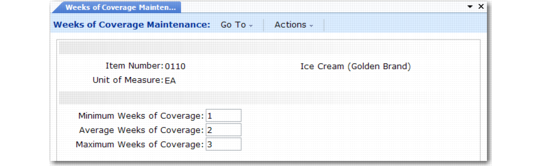
Use Weeks of Coverage Maintenance (33.5.1) to set up an item’s generic coverage factors. Coverage factors are global, not site-specific, and they must be positive whole numbers.
Weeks of Coverage Maintenance (33.5.1)
Item Number
Enter the family item number.
UM
The screen displays the inventory unit of measure from the item master record.
Minimum Weeks of Coverage
Enter the minimum number of weeks of global inventory coverage required for this item. The system uses this factor to calculate and display projected inventory shortages.
Average Weeks of Coverage
Enter the number of weeks of upcoming sales forecasts that corresponds to your company’s desired inventory coverage level for this item. Plan calculations use this factor to calculate target inventory levels.
Maximum Weeks of Coverage
Enter the maximum number of weeks of global inventory coverage required for this item. The system uses this factor to calculate and display projected inventory surpluses.
Use two programs to review weeks of coverage factor data:
• Weeks of Coverage Inquiry (33.5.2) displays coverage factors by item, purchase/manufacture code, and buyer/planner.
• Weeks of Coverage Report (33.5.3) is similar to the inquiry, but you can also select information for a range of items.