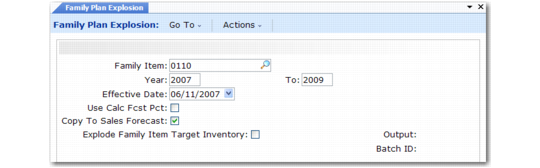
Exploding Family Plans
Run Family Plan Explosion (33.7.14) only when you are ready to transfer control of the family production quantities down to the end-item level.
Important: Do not record forecast quantities in Sales Data Maintenance (33.13.13) for the end items in the family before running Family Plan Explosion. If you do, the explosion will overwrite them. However, you can adjust forecast quantities after running the explosion.
Family Plan Explosion (33.7.14)
Family Item
Enter the family item number.
Year/To
Enter a maximum range of three calendar years, starting with the current year. For example, when the start year is 2002, the end year must be 2004 or less.
Effective
Enter the start date for including family plan quantities in the explosion. The default date is the Monday of the current week. For planning periods after this date, the explosion generates dependent demands from the family gross production quantities. It also overwrites existing end-item forecast quantities for these periods. The explosion ignores forecast quantities for planning periods prior to the date.
Use Calc Fcst Pct
Enter Yes to explode the plan based on actual forecast percentages updated by Global Consolidation (33.7.1). Do this if you used the Roll Up End Items option during the consolidation. Otherwise, enter No to use the subfamily percentages from Family Hierarchy Maintenance (33.3.1). To compare the two percentages, review the Rollup Percentage Report (33.7.7). See
Roll Up End Items.
Copy to Sales Forecast
If you generated the family plan from family forecasts, you must set this option to Yes. The explosion then generates sales forecast records for the end-item production demands. If you do not set this option, you will not be able to trace production demands back to their respective marketing sites because MRP and DRP will not generate intersite requests for family production demands.
Explode Family Item Target Inventory
If Yes, target inventory calculated at the family level is exploded down the family hierarchy tree to the end-item level. If No, only family level inventory is calculated.
If you set this field to Yes here, make sure you set Calculate Target Inventory Level to No in Source Matrix Explosion (33.13.8). Otherwise, the end-item target inventory calculated by this program will be overwritten.