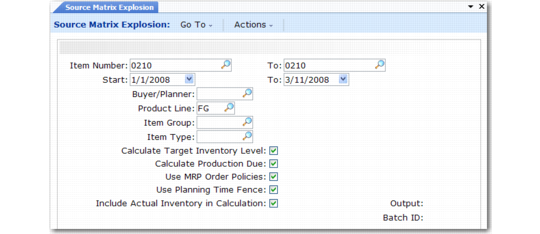
Running Source Matrix Explosion
Run Source Matrix Explosion (33.13.8) to calculate the operations plan. If necessary, you can rerun the explosion. Subsequent explosions completely overwrite the effects of previous ones. The explosion takes a long time and is best run in batch.
Source Matrix Explosion (33.13.8)
Item Number/To
Enter the item number range.
Start/To
Enter the effective date range. The maximum range is three years, including the entire start year. For example, when the start year is 2002, the end year must be 2004 or less. When you specify a non‑Monday start date or a non-Sunday end date, the system changes it.
Buyer/Planner
If you specify a value, the system processes only items assigned to this person.
Product Line
If you specify a value, the system processes only items belonging to this product line.
Item Group
If you specify a value, the system processes only items belonging to this item group.
Item Type
If you specify a value, the system processes only items belonging to this item type.
Calculate Target Inventory Level
Enter Yes to calculate target inventory levels based on item average weeks-of-coverage factors. Enter No to prevent the explosion from overwriting target inventory quantities recorded or adjusted in Inventory Data Maintenance (33.13.17).
Calculate Production Due
Enter Yes to calculate each item’s production due quantity. Enter No to prevent the explosion from overwriting quantities recorded or adjusted in Production Data Maintenance (33.13.21).
Use MRP Order Policies
Enter Yes to adjust calculated production due quantities based on the supply site’s item order policies and order modifiers. Enter No to calculate production due independent of these factors.
Use Planning Time Fence
Enter Yes to prevent the explosion from recalculating production quantities due within the item-site time fence period. This setting protects the master schedule against last-minute orders with a cumulative lead time that exceeds the available production time. Enter No to permit recalculations.
Include Actual Inventory in Calculation
When the global family sales forecast is calculated by Global Consolidation (33.7.1) by rolling up end items, you can choose to include or exclude the opening inventory balance in the calculation. This field has the same effect when the plan is exploded out. The field is typically set the same way in both programs.