Changing Site Operations Plans
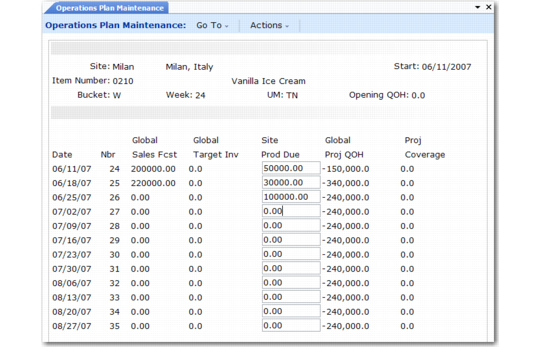
If you are a central master scheduler, use Operations Plan Maintenance (33.15.1) to view global sales forecasts and target inventory levels and to adjust production due quantities for individual supply sites. As you change quantities, the system recalculates projected quantity on hand and projected weeks of coverage.
You can also delete an operations plan, either for an entire year, or for only specific periods within the year—for example, if an item becomes obsolete.
You can display item information either by calendar week or by general ledger period. If you normally plan in weeks, do not change production quantities in period view. If you do, the system permanently reassigns all weekly quantities to the first week of the period.
To delete a plan for an entire year, choose the plan and press Delete. To delete a plan for part of the year, reset the production due quantities to zero for the affected period.
Operations Plan Maintenance (33.15.1)
Site
Enter the supply site code.
Start
Enter the start date for the first calendar week or financial period. The default start date is the system date. If the date you enter is not the Monday of the week or the first day of the period, the system changes it.
Item Number
Enter the end-item number.
Bucket
Enter W to group item quantities into calendar weeks that start on Mondays. Enter P to group quantities into financial periods with a start date that is the first day of the period.
Nbr
Enter the number of the first calendar week or financial period to display. If you enter a bucket number instead of a start date,
the system fills in the start date for you. The system also changes the start date to the first day of this week or period if this day is not already the start date.
UM
Enter the unit of measure for viewing and changing item quantities. The default unit of measure is the one from the item master record.
Opening QOH
The screen displays the item’s opening on-hand inventory balance.
Sales Fcst
The screen displays the item’s consolidated demand from all marketing sites. These global sales forecasts can originate from either end-item sales forecasts or dependent end-item demand calculated by Family Plan Explosion (33.7.14).
Target Inv
The screen displays the item’s consolidated target inventory level for all sites, based on the average weeks-of-coverage factor or on quantities recorded for individual sites.
Prod Due
The screen displays the item’s projected production demand for the supply site. The formula is:
(Sales Forecast + Target Inventory) – Previous Week’s Projected QOH
For the first week, the previous projected QOH equals the opening QOH. When you change this quantity, the system recalculates global projected quantity on hand and weeks of coverage.
Proj QOH
Initially, projected quantity on hand equals the target inventory level. For the first week, the projected QOH is the opening QOH. When you change production due, the system recalculates it as:
[(Previous Week’s Projected QOH + Production Due) – Sales Forecast]
Coverage
Initially, projected weeks of coverage is the item’s average weeks-of-coverage factor. When you change production due, the system recalculates this, using the item’s minimum and maximum coverage factors to project inventory shortages (–) and surpluses (+) relative to the average weeks of coverage. An asterisk (*) indicates that projected coverage satisfies the maximum coverage requirement specified in Operations Plan Control (33.1.24).