Running Operations Plan Explosion
Use Operations Plan Explosion (33.15.13) to explode the operations plan. Whenever you change the operations plan, rerun the explosion to change the original records and create new firm planned orders. You can rerun the explosion as often as necessary. Subsequent explosions ignore previously approved items.
To review or change orders generated by the explosion, use the Work Orders module. For base process items, run Multiple WO Status Change (16.8) to change the order status from batch (B) to firm planned (F). This generates the firm planned orders for co-products and by-products associated with the base process. You must change the work order status before you can approve these orders in the Enterprise Operations Plan module.
Exploded orders also update projected quantity on hand, planned orders due, and planned order release quantities in MRP records. To review MRP records after an explosion, use one of the inquiries or reports in the Material Requirements Plan module.
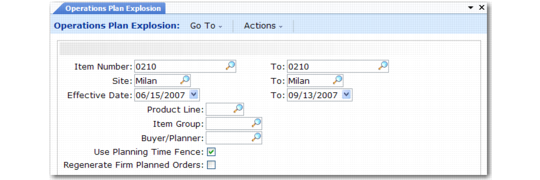
Operations Plan Explosion (33.15.13)
Item Number/To
Enter the item number range.
Site/To
Enter the site range.
Effective/To
Enter the effective date range. When you specify a non-Monday start date or a non-Sunday end date, the system changes it.
Product Line
If you specify a value, the system processes only items belonging to this product line.
Item Group
If you specify a value, the system processes only items belonging to this item group.
Buyer/Planner
If you specify a value, the system processes only items assigned to this person.
Use Planning Time Fence
Enter Yes to prevent the explosion from recalculating production quantities due within the item-site time fence period. This setting protects the master schedule against last-minute orders with a cumulative lead time that exceeds the available production time. Enter No to permit recalculations.
Regenerate Firm Planned Orders
Enter Yes to regenerate operations plan orders created by earlier explosions. Enter No to run a net-change explosion. If you run the explosion and later change production due quantities in the operations plan, the system automatically updates production quantities on the corresponding orders, regardless of how you set this option. The system also updates the orders if you change the order due date or release date. However, the system does not update orders if you change other information that affects them, such as item lead times. Whenever you make changes like these, enter Yes.