Running Operations Plan Approval
Use Operations Plan Approval (33.15.14) to approve individual orders or items in a chosen range. There are two frames:
• In the first, choose groups of orders for approval.
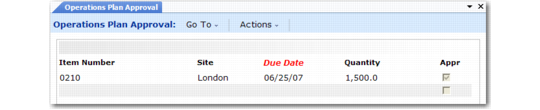
• In the second, modify the selection for individual orders.
After approval, adjust due dates, release dates, quantities, or other information with the appropriate maintenance programs in the Work Orders, Repetitive, or Purchasing module.
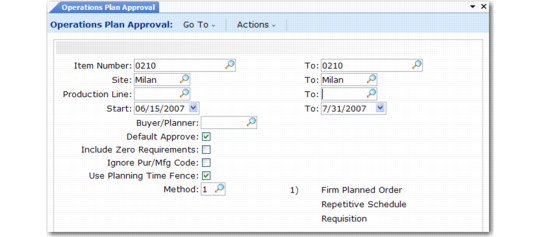
Operations Plan Approval (33.15.14), Selection Criteria
Item Number/To
Enter the item number range.
Site/To
Enter the site range.
Production Line/To
Enter the production line range.
Start/To
Enter the effective date range. When you specify a non-Monday start date or a non-Sunday end date, the system changes it. Enter the effective date range for the load. When you specify a non-Monday start date or a non-Sunday end date, the system changes it. To load inventory quantities for a planning week, you must set the effective date to the Monday of the previous week.
Note: The ending inventory of the prior week becomes the beginning projected available inventory for the current planning week.
Buyer/Planner
If you specify a value, the system processes only items assigned to this person.
Default Approve
Enter Yes to approve most or all orders. You can exclude individual orders in the second approval screen. Enter No to choose orders manually.
Include Zero Requirements
Enter No to exclude zero-quantity work orders. Enter Yes to include them.
Ignore Pur/Mfg Code
Enter No to approve orders only to formats appropriate for the item master purchase/manufacture code, and to choose only orders appropriate for the approval method. Enter Yes to approve all orders.
Use Planning Time Fence
Enter Yes to choose only orders due in the immediate future. Enter No to choose all orders regardless of due date.
Method
Enter 1 to approve operations plan orders as firm planned work orders, 2 to approve orders as repetitive schedules, or 3 to approve orders as purchase requisitions. To prevent the system from approving orders to formats inappropriate for their item purchase/manufacture code, set Ignore Pur/Mfg Code to No.
Click Next to proceed to the order selection screen.
Operations Plan Approval (33.15.14), Order Selection