Creating Simulation Plans
To create simulation plans from an active family plan, operations plan, or another simulation plan, use Copy Plan to Simulation (33.17.1). This program copies sales forecasts, target inventory levels, and production due quantities. However, it does not copy projected quantity on hand or weeks of coverage. When you change quantities in the simulation plan maintenance programs, the system recalculates these.
Note: You cannot change weeks of coverage or other plan calculation factors in full-scale simulation mode. However, you can save the active plan to a simulation table, change the factors and recalculate the plan. Then, if necessary, copy the stored plan back. Obviously, if you do this, you must institute appropriate procedural controls.
You can generate an unlimited number of simulation plans.
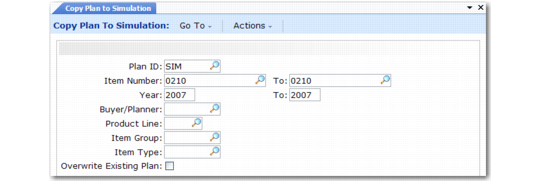
Copy Plan to Simulation (33.17.1)
Plan ID
Enter a code (maximum eight characters) to identify the simulation plan.
Item Number/To
Enter the item number range.
Year/To
Enter a maximum range of three calendar years, starting with the current year.
Buyer/Planner
If you specify a value, the system processes only items assigned to this person.
Product Line
If you specify a value, the system processes only items belonging to this product line.
Item Group
If you specify a value, the system processes only items belonging to this item group.
Item Type
If you specify a value, the system processes only items belonging to this item type.
Overwrite Existing Plan
Enter Yes to overwrite previously generated simulation plan records for the selected items, plan years, and so on. Enter No to preserve the previous plan records in the new simulation plan.