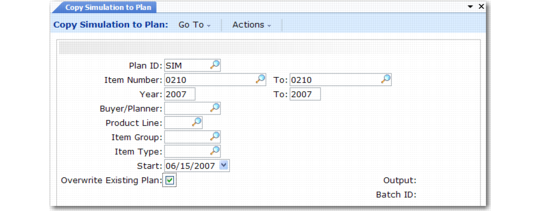
Copying Simulation Plans to Active Plans
When you are satisfied with a simulation plan, use Copy Simulation to Plan (33.17.3) to copy the plan back over the active family plan or operations plan.
Note: Be careful not to copy the simulation plan prematurely or in error. The system does not keep a backup copy of the old active plan.
Copy Simulation to Plan (33.17.3)
Plan ID
Enter a code (maximum eight characters) to identify the simulation plan.
Item Number/To
Enter the item number range.
Year/To
Enter a maximum range of three calendar years, starting with the current year.
Buyer/Planner
If you specify a value, the system processes only items assigned to this person.
Product Line
If you specify a value, the system processes only items belonging to this product line.
Item Group
If you specify a value, the system processes only items belonging to this item group.
Item Type
If you specify a value, the system processes only items belonging to this item type.
Overwrite Existing Plan
Enter Yes to overwrite previously generated simulation plan records for the selected items, plan years, and so on. Enter No to preserve the previous plan records in the new simulation plan.