Intersite Requests at the Demand Site
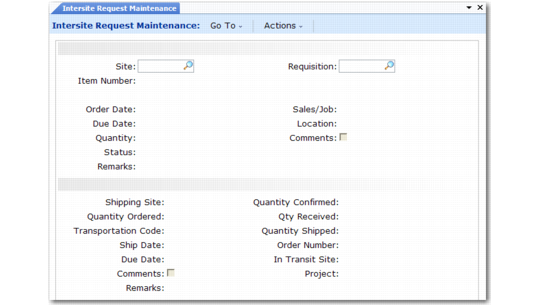
Create intersite requests at a receiving site manually with Intersite Request Maintenance (12.15.1) or by running DRP. You can also use Intersite Request Maintenance to modify request status, due date, and receiving location at the receiving site. This site determines the quantity ordered and the transportation code for orders from each supply site. You can change the transportation code, but not the quantity ordered, at the supply site.
Intersite Request Maintenance (12.15.1)
Like work orders, intersite requests can have a status of planned, firm planned, exploded, allocated, released, or closed. The statuses have varying affects, as follows:
P (Planned). This status applies to system-generated requests only. Planned requests can be deleted or replanned by the system the next time MRP or DRP is run.
F (Firm Planned). This is the default status for intersite requests created in Intersite Request Maintenance. Firm-planned requests are not rescheduled by MRP or DRP. Instead, the system generates action messages suggesting changes. Manually update requests with this status, as needed.
E (Exploded). The status of an intersite request is changed to Exploded when the supply site confirms the request with Intersite Demand Confirmation. For confirmed requests, DRP uses the confirmed quantity and due date. The original quantity and due date remain for comparison.
A (Allocated). The status of an intersite request is changed to Allocated when the supply site references the intersite request on a distribution order. This is the default status for intersite requests created dynamically as part of creating a distribution order.
Because intersite request status codes are identical to work order status codes, you can manually set request statuses to Batch (B), Released (R), or Closed (C). The B and R status codes have no system-assigned significance for intersite requests, but individual demand sites may use them for special purposes. For example, you might manually assign a status of Released to requests when you receive confirmations from supply sites.
Manually setting the status of an intersite request to C (closed) does not change quantities associated with the request. It does, however, have the following effects:
• Reduces the quantity on order in the inventory master at the receiving site by the quantity open on the request
• Lets you archive/delete the intersite request at the supply site even though the quantity shipped is not the same or greater than the quantity confirmed
Archiving Intersite Requests
Use Intersite Request Delete/Archive (12.15.23) at the receiving site to delete and archive intersite requests created automatically by planning functions or manually using Intersite Request Maintenance. To delete or archive an intersite request, the quantity received on the request must be equal to the quantity confirmed.
When you delete an intersite request, the system does not automatically delete the demand records associated with that request at the shipping site. Generally, you should use Closed Intersite Demand Delete/Archive (12.17.23) to delete demand records at supply sites before using this function to delete corresponding intersite requests at demand sites.