Setting Up Control Programs
Settings in the following control programs affect shippers:
• DO Container/Shipper Control (12.19.24) sets various processing options.
• Distr Order Shipper Acct Control (36.9.8) specifies operational accounting parameters that apply to general DO shipping.
Defining DO Container/Shipper Processing Options
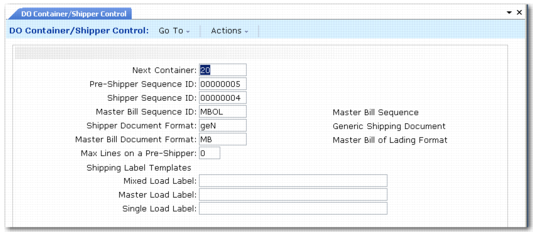
To enable full global shipping functionality, you must update DO Container/Shipper Control to include default pre-shipper, shipper, and master bill of lading sequence IDs and document formats.
DO Container/Shipper Control (12.19.24)
Next Container
Enter the next sequential container number to be assigned as a default when creating a container using DO Container Maintenance (12.19.7).
Pre-Shipper Sequence ID and Shipper Sequence ID
Enter the NRM sequence codes used for DO pre-shippers and shippers, respectively. The system uses these codes to generate sequence numbers for all pre-shippers or shippers that do not use inventory movement codes or have no available shipping group. Enter an existing NRM sequence code with a target dataset associated with pre-shippers (abs_id.preship) or shippers (abs_id.shipper). The sequence description appears to the right of the code.
Master Bill Sequence ID
Enter the NRM sequence code used for master bills of lading. The system uses this code to generate sequence numbers for all master bills of lading with no available shipping group. Enter an existing NRM sequence code with a target dataset associated with master bills of lading (abs_id.mbol). The description appears to the right of the code.
Shipper Document Format
Enter a valid document format code applicable to DO pre-shippers/shippers or leave blank to specify no format code. This format is assigned by default to all DO pre-shippers/shippers that do not use inventory movement codes or have an available shipping group. The description appears to the right of the code.
Master Bill Document Format
Enter a valid document format code applicable to master bills of lading or leave blank to specify no format code. This format is assigned by default to all master bills of lading that do not use inventory movement codes or have an available shipping group. The description appears to the right of the code.
Max Lines on a Pre-Shipper
Enter the maximum number of lines to print on a pre-shipper created by DO Picklist/Pre-Shipper–Auto (12.19.1). If zero, this option has no effect.
Mixed Load Label, Master Load Label, Single Load Label
Enter the name of a template file to be used for mixed load, master load, or single load shipping label formats. These are barcode labels that enable shipments to be received with barcode readers
Defining Operational Accounting Settings
Use Distr Order Shipper Acct Control (36.9.8) to specify whether inventory movement codes and shipment information for receipt processing are required and whether DO Pre-Shipper/Shipper Confirm (12.19.13) generates a separate transaction history record for each item detail record on a shipper or a container.
DO Distr Order Shipper Acct Control (36.9.8)
9)
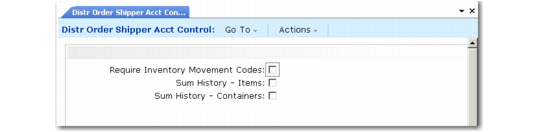
Require Inventory Movement Codes
This field indicates whether inventory movement codes are required for newly created DO pre‑shippers and shippers. If you use movement codes and shipping groups, set this field to Yes to ensure they are always applied. This field should be No if you are not using advanced shipping features or if the setup of inventory movement codes and shipping groups is not complete. The default is No.
Sum History–Items, Sum History–Containers
These settings determine whether DO Pre-Shipper/Shipper Confirm generates a separate transaction history record for each item or container detail record on a shipper or summarizes transaction history by item or container.
No: A separate transaction history record is generated for each detail record on the shipper.
Yes: A transaction history record is generated for each unique combination of the following shipper detail data: distribution order number, line number, item or container number, ship-from site and location, lot or serial number, and reference number.
Setting Sum History–Items and Sum History–Containers to Yes may significantly improve system performance when confirming shippers that reference the same item or container numbers, site and location detail, and distribution order information on multiple shipper detail records. The improvement is less significant when you use serial numbers to uniquely identify individual items or containers.