Deleting Shippers
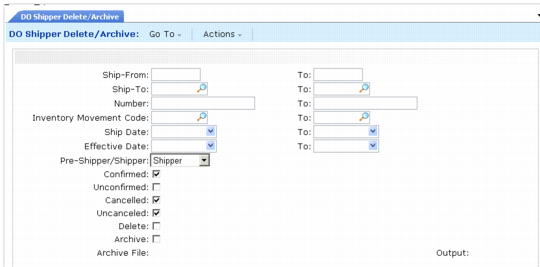
You can permanently remove DO shipper information when online records are no longer needed using DO Shipper Delete/Archive (12.19.23).
Select documents to delete and archive by ship-from site, ship-to address, document number, inventory movement code, ship date, and GL effective date. You can also choose to select documents based on their cancel and confirm status.
The value of Allow Discarding specified in Number Range Maintenance for the Number Range Management (NRM) sequence used to generate shipper numbers affects which documents can be deleted. When Allow Discarding is No, the system does not permit any gaps in numbering sequence. If the selection criteria you enter would result in any documents (either confirmed or unconfirmed shippers or pre-shippers) being left in the system with lower numbers than the deleted documents, the delete fails. In this case, appropriate error messages are written to the program output.
To complete the archive/delete, you must change your selection criteria to include all numbered documents with Allow Discarding set to No.
The system does not automatically delete historical information at period or year-end. You can delete this information as frequently or infrequently as you prefer. How often you should run this function depends on how long you need to retain historical information in your database. Most companies keep historical data for at least one year or longer, depending on availability of disk space.
You should run this function twice. First, run it with Delete set to No and review the report. Then, run it with Delete set to Yes.
When you set Delete to Yes, shipper records that satisfy the selection criteria are deleted from the database. If you set Archive to Yes, deleted data are copied to an ASCII file that can be reloaded using Archive File Reload. Otherwise, deleted data cannot be recovered.
When Archive is Yes, selected data is stored in a file named doYYMMDD.hst where do is the record type and YYMMDD is the file creation date. If this file does not exist in the system, it is created. If it does exist because you already ran delete/archive the same day, the system adds the additional archived records to the end of the file.
Since the generated file has no internal label or content description, you should keep a record of the file name and contents, in case you need to reload the data. Also, remember that you cannot selectively reload data from archive files. If an archive file contains data for an entire year and you need to access records for one month, you must reload all the data in the file to access the records you need.
Important: Date and time in the stored data are formatted based on the country code associated with the user who archived the data. If a user with a different date and time format reloads the data, load errors and corrupted data can occur.
To avoid these problems, use the same settings when archiving and reloading the data. Before loading data, use User Maintenance to temporarily change your country code to match that of the user who archived the data.
You should define menu security for this program.
DO Shipper Delete/Archive (12.19.23)