Resource Maintenance
Resource Maintenance
Resources must be defined before you can evaluate resource load.
Product line planning, master scheduling, and operations planning activities are feasible only if key resources are available. Rough-cut resource planning is usually done prior to committing production resources to a plan.
First, identify the resources in your company that are bottlenecks or can't be easily increased in the short term. These are your key resources. Examples of key resources include specialized labor, special machinery, and cash.
Define key resources in Resource Maintenance (21.1), then set up resource bills for:
• Individual product lines in PL Resource Bill Maintenance (21.5)
• Items in Item Resource Bill Maintenance (21.17)
Load Profiles
Resource bills (also called load profiles) help you compare the resource capacity needed for production against the available capacity. If you need more of any resource than you have available, you must change the plan or increase the resource capacity.
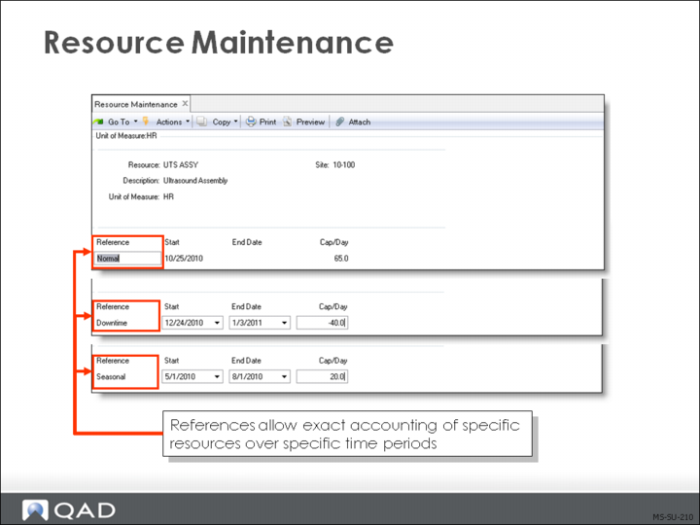
Resource capacity changes over time. For example, another machine or shift is added, or downtime and holidays are scheduled. These changes are recorded with a reference code, start date and end date.
Cap/Day can be positive or negative. If the normal capacity for a resource is 100 hours per day, and you are planning a shutdown on May 10 and 11, you would enter it as:
• Reference [Shutdown]
• Start Date [May 10]
• End Date [May 11] and
• Cap/Day [-100]
A resource’s capacity on a specific date is the cumulative capacity from the references that are in effect on that date.
Description
A short description of this resource that prints on reports and inquiries, as space permits
The lookup on the Resource field displays the resource codes and descriptions. You can search through this window in sequence by either field or description. This may influence how you set up your descriptions. For example, you may choose to make the first few characters or words significant for searching purposes.
Reference
This optional code identifies a level of resource capacity, such as:
• Normal
• Vacation
• Shutdown
If you use Enterprise Ops Plan, you can access the capacity information for this time period on item resource bills that reference this code. Otherwise, the reference merely describes the resource capacity level for the specified time period.
The capacity of each resource is stated in terms of an average level per day over a certain time period. The capacity may change, perhaps for vacation plant shutdowns or adding a second shift. These capacity changes are identified by reference. The total capacity on any given day is the sum of the capacity components effective on that day.
Example: A machine resource has the following capacity levels:
• NORMAL Jan 1 to Dec 31 7 hrs/day
• SHUTDOWN Aug 1 to Aug 31 -7 hrs/day
• 2nd SHIFT Oct 1 to Dec 31 7 hrs/day
The total capacity on August 15th is zero, while the total capacity on October 15th is 14 hours per day.
Key Resource
A single resource can consist of multiple positive or negative dated components.
RCCP tests resources that may limit production of an item's schedule:
• Skilled labor hours
• Production line quantities per hour
• Inspection or testing hours
• Scheduled losses of resource capacity
• Overlapping vacations
• Equipment replacement
Components of a Resource
• Each key resource is defined separately in QAD Enterprise Applications
• Available in different quantities at different times of the year
• Normal resource quantities are entered as primary resource references or components
• Additional references include the amount by which they add to or subtract from capacity
Example: In a firm where five specialized fabricators (such as aluminum welders) are employed, the resource is defined in welder hours. The first component could be defined as the hours that the five employees provide in capacity per day (5 welders x 7 hours = 35 hours/day).
Adding Time-Phased Changes
Additional references can be added for employee’s vacations that reduce capacity
• BobV –7.0 hours, July 1 to July 10
Periods of scheduled overtime will increase capacity
• OT 20 hours, September 15 to October 15
When the resource is tested against scheduled production, the system calculates the available resource quantity using these dates and the shop floor calendar.