Item Resource Bill Maintenance
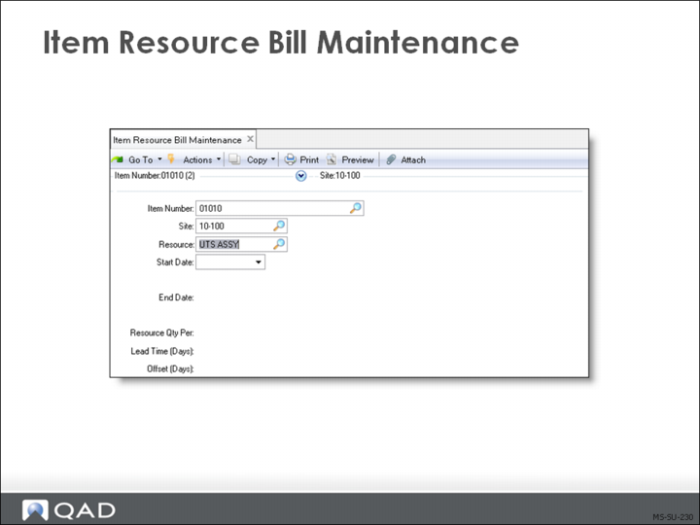
Item resource bills are used only to evaluate the manufacturing schedule. Item Resource Bill Maintenance (21.17) records information on resource requirements for individual items.
Manufacturing schedules are feasible only if key resources are available. Rough-cut capacity planning verifies resource availability prior to committing production resources. An item resource bill (or load profile) specifies the amount of a resource required to make one unit of the item. The resource amount is expressed in the resource unit of measure such as tons or hours.
Example: To produce a case of ice cream, a blending machine processes 36 kilos of vanilla cream. In the resource record for the blending machine, capacity is expressed in metric tons. Therefore, the resource quantity per for the ice cream item resource bill is 0.036 tons.
The resource bill also determines when and for how long the resource is required.
Lead Time (Days)
Identifies the number of production days the resource is required
Offset (Days)
Identifies how many days in advance of production the resource is required
For the ice cream, the blending machine is used for one work day, but the order for the ice cream must be released two days in advance of the requirement.
Note: Lead time must always be at least 1 (if zero, no load will be calculated).
Review Item Resource Load Summary Report (21.22) and Item Resource Load Detail Report (21.24, 21.48 in Enterprise Edition .NET UI) before committing resources to the production plan.
If you need more of any resource than you have available, you must either change the plan or increase the capacity of the resource.
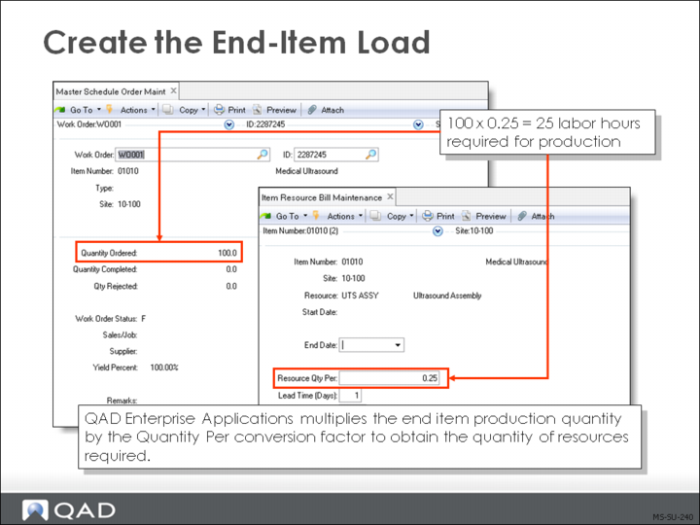
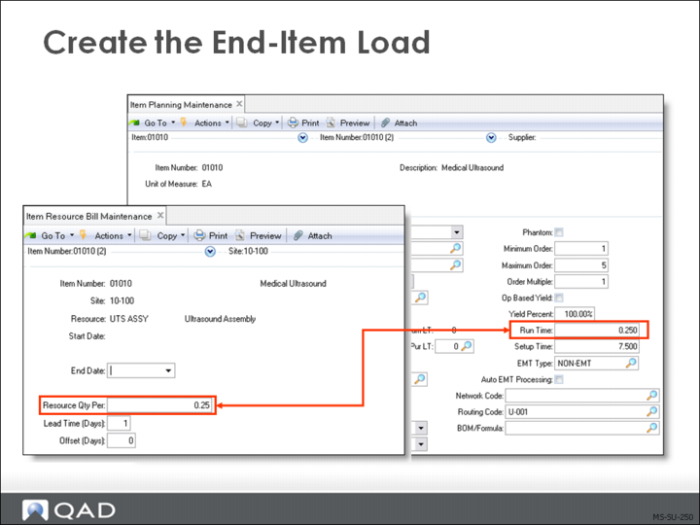
Creating the End-Item Load
QAD Enterprise Applications multiplies the end item production quantity by the Quantity Per conversion factor to obtain the quantity of resources required.
• Master Schedule Order Maintenance (22.13)
• Item Resource Bill Maintenance (21.17)
Production Conversion Factor
To see exactly how much of a certain resource is required by a scheduled production quantity, the production must be measured in resource units—typically hours or items per day. To do this in QAD Enterprise Applications, determine a conversion factor and enter it in the Resource Qty Per field in Item Resource Bill Maintenance (21.17).
Example: To convert production schedules into resource units for RCCP, determine how many hours (or other units) it takes to create a single scheduled end item. If it takes 1.3 hours to complete
one end item, the conversion is 1.3. To make 100 end items for the scheduled item, it would take 100 x 1.3 = 130 hours.
Lead Times
In order for QAD Enterprise Applications to calculate capacity, at least 1 must be entered in the Lead Time field in Item Resource Bill Maintenance (21.17).
• Lead time is the number of days over which a resource must be available
• A testing process might be required three days after work order release and need two days
• Offset = -3, Lead Time = 2
• Schedule the first date the resource is required
• Use work order release dates and number of days the resource is needed
• The Offset is the number of days from work order release that a resource must be available
• Positive for days before work order release
• Negative for days following
• Zero for the same day
Note: This method of calculating the offset is the opposite of that used for product structures.
Exercise: Setup
Enter and Review a Forecast
This exercise covers how to enter and review a forecast, and how to set up and observe forecast consumption. Before doing this, however, you will review the items that will be used for the forecasting and master scheduling activities.
1 Using Product Structure Inquiry (13.6) to review the parent/component relationship for parent item 01030, and its component items.
2 In Sales Order Control (7.1.24), set Ln Format S/M to Single and set Consume Fwd to 1, Consume Back to 2.
3 Use Forecast Maintenance (22.1) to enter the following weekly forecast for item 01030 at site 10-100, beginning with the Monday of the next week and covering the following nine weeks
Weeks | Quantity |
1 | 100.0 |
2 | 120.0 |
3 | 130.0 |
4 | 140.0 |
5 | 150.0 |
6 | 140.0 |
7 | 130.0 |
8 | 120.0 |
9 | 110.0 |
10 | 100.0 |
4 Run the Forecast Report (22.4) on both summary and detail for item 01030 only at site 10-100 for the next ten weeks.
5 Use Master Schedule Summary Inquiry (22.18) to run the master schedule summary inquiry for 01030 at site 10-100. You should see all ten periods of forecast, plus the forecast simulation distribution.
6 Use Sales Order Maintenance (7.1.1) to create a new Sales Order for customer 10C1003.
a Set the due date to two weeks from next Monday.
b Set Site to 10-100 and Confirmed to Yes.
c On order line, enter item 01030 and a quantity of 250.
7 Run the Forecast Inquiry (22.3) for 01030 at site 10-100 and review how the forecast has been consumed in the Net Forecast column.
8 Run the Master Schedule Summary Inquiry (22.18) and Master Schedule Detail Inquiry (22.21) for 01030, site 10-100 to review the forecast.
Create a Labor Resource
In this exercise, create a labor resource and a conversion factor and then compare the labor resource capacities to the load.
1 Using Calendar Maintenance (36.2.5), verify there is a shop calendar for site 10-100 (with work center and machine blank). Make sure that Monday through Friday are the established work days and that each day shows eight hours.
2 Use Resource Maintenance (21.1) to add labor resources for site 10-100.
a Enter Labor in the Resource field for site 10-100. Use a description of Labor hours. The unit of measure (UM) is HR for hours.
b Add the following two references:
Reference | Start | End Date | Cap/Day |
Normal | 01/01/YY [YY is the current year] | [Blank] | 32
[4 assemblers x 8 hours/day] |
Downtime | [Four weeks from next Monday] | [Five weeks from next Monday] | 8 |
c Use Resource Browse (21.2) to verify your data is correct. Set the browse to begin at labor.
Add a Family Item
In this exercise, you will add a family item in order to forecast and schedule multiple items within the same family.
1 Use Item Master Maintenance (1.4.1) to create a family planning item to represent the ultrasound equipment family.
Field | Data |
Item Number | 01000 |
Description | Ultrasound equipment |
Product Line: | 10 |
Item Type | Family |
Status | ACTIVE |
Site: | 10-100 |
Master Schedule: | Yes |
Plan Orders: | Yes |
Order Policy: | POQ |
Buyer/Planner: | [your initials] |
Pur/Mfg: | F |
2 Using Product Structure Maintenance (13.5) to create the planning bills for family item 01000. Add parent item 01000 in the product structure and add its components under it:
Component | Description | Quantity | Structure Type | Forecast Percent |
01010 | Medical Ultrasound | 1 | P | 10% |
01020 | Implantable Ultrasound | 1 | P | 20% |
01030 | Consumer Ultrasound | 1 | P | 30% |
01040 | Industrial Ultrasound | 1 | P | 40% |
3 Use Forecast Maintenance (22.1) to enter a forecast for family planning item 01000 at site 10-100; 1000 for each of six weeks, starting with next week.
4 View items 01000 and 01010 at site 10-100 in Master Schedule Summary Inquiry (22.18).
5 Run Selective Materials Plan (23.3) for items in the range from 01000 to 01040 at site 10-100; enter mrp in the Output field.
6 Review the Master Schedule Summary for items 01000, 01010, 01020, 01030, and 01040. The forecast for the planning item is shown for pegging purposes only. Because the purchase/manufacture code is F, MRP calculates production forecast but does not plan orders for the planning item.
7 Using Sales Order Maintenance (7.1.1), create a sales order in which you sell item 01010 at site 10-100, qty 100, due one week from Monday to customer number 10C1003.
8 Run Selective MRP for items in the range from 01000 to 01040 at site 10-100.
9 Review the Master Schedule Summary for 01000 and 01010.
Create an Item Resource Bill
In this exercise, you create an item resource bill that will be used to determine if the master schedule is achievable.
1 Items 01010, 01020, 01030, and 01040 require labor resources. Use Item Resource Bill Maintenance (21.17) to create an Item Resource Bill with the following data:
Item | 01010 | 01020 | 01030 | 01040 |
Site: | 10-100 | 10-100 | 10-100 | 10-100 |
Resource: | Labor | Labor | Labor | Labor |
Start Date: | [blank] | [blank] | [blank] | [blank] |
End Date: | [blank] | [blank] | [blank] | [blank] |
Resource Qty. Per: | 4 | 0.05 | 0.1 | 0.2 |
Lead Time: | 2 | 1 | 1 | 1 |
2 Review the Item Resource Load Summary Inquiry (21.21) and Item Resource Load Detail Inquiry (21.23)
• Has the schedule exceeded capacity in any period?
• Based on this information, do you think that the plan can be made?