Master Schedule Order Maintenance
Master Schedule Order Maintenance
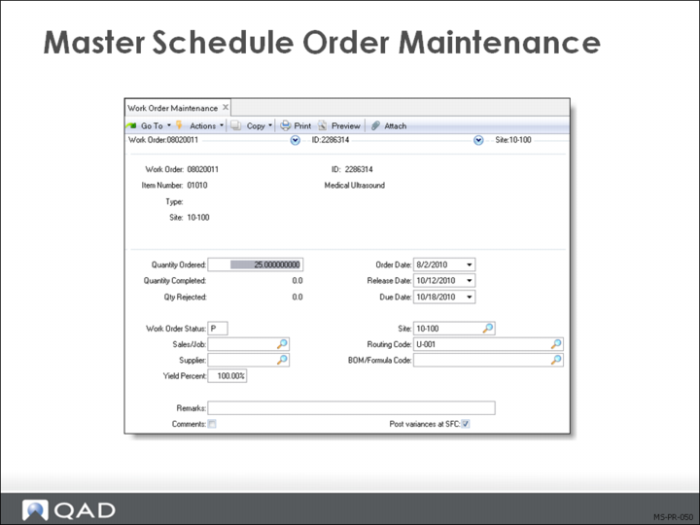
Note: This screen is the same as Work Order Maintenance (16.1). Within the system, master schedule work orders and work orders created in the work order module are identical.
To manage the master schedule manually, use Master Schedule Order Maintenance to create work orders for your master schedule items. Enter master schedule orders as firm planned orders and manage and release them like normal work orders.
To have MRP review master scheduled items and produce action messages, set the following values in Item Planning Maintenance (1.4.7):
• Master Schedule = Yes
• Plan Orders= No
• Order Policy= Any option other than blank
Note: These settings insure the system will not create planned orders, but will create action messages about the orders you create.
The firmed supply orders create the master schedule and become the primary input to MRP.
• Firmed planned work orders using Master Schedule Order Maintenance (22.13)
• Repetitive schedules using Schedule Maintenance (18.2.1). This can be used to master schedule items, even if work orders track actual production (this means you have to take the exploded type S work orders from the repetitive schedule and change them to R)
• Purchase requisitions using Purchase Requisition Maintenance (5.1.4)
MPS Using Forecast Maintenance
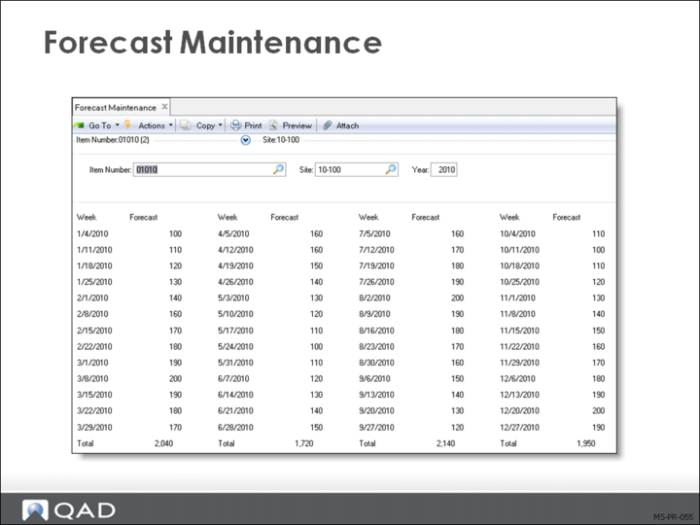
MPS can also be loaded using Forecast Maintenance (22.1). This function allows you to enter up to 52 weekly buckets of forecast demand for an item at a site. This demand is seen by MRP and planned orders are created for the net forecast. The master scheduler can then review the plan using the summary and detail inquires.
To use this functionality, set these values in Item Planning Maintenance (1.4.7):
• Master Schedule: Yes
• Planned Orders: Yes
• Order Policy: Any valid value
Master Schedule Summary Inquiry
Master Schedule Summary and Detail Inquiries/Reports
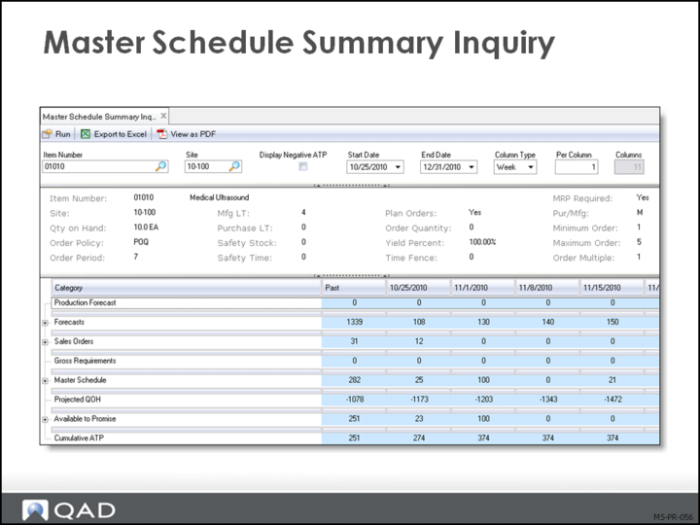
The Master Schedule Summary Inquiry (22.18) and Report (22.19) are let the master scheduler review the overall situation for an item. The inquiry and report both display the information listed here.
Note: The Master Schedule Detail Inquiry (22.21) and Report (22.22)display the same information as the Master Schedule Summary Inquiry (22.18) and Report (22.19), sequenced by due date. They also include source-to-demand pegging details, allowing you to identify the actual work order or sales order generating a particular item requirement.
Header Information
The header show the item, site, start (and or end date) date of the inquiry and whether the buckets are D days, W weeks, M months, or P general ledger period. It also shows how many periods you choose to display in each column. You can display two weeks in each column for example. The header also shows the quantity on hand the MRP Required field and all of the item planning data for the site specified.
Production Forecast
System-calculated forecast used in multilevel master scheduling
Forecast
Forecast quantity for an item, either loaded into forecast summary tables using Simulation to Summarized Forecast or entered manually using Forecast Maintenance (22.1) or Forecast Worksheet Maintenance (22.2).
Sales Orders
Demand derived from confirmed sales orders and required ship schedules
Gross Requirements
The sum of an item’s requirements from forecasts, higher-level products, confirmed sales orders, required ship schedules, service items, and intersite orders generated by DRP. Gross requirements do not take into account inventory on hand or scheduled receipts.
Master Scheduled Receipts
Total scheduled receipts for an item from work orders, repetitive schedules, purchase orders, and distribution orders.
Projected QOH
Projected item quantity on hand, calculated by the system. This is a projection by period of an item’s on-hand balance plus scheduled receipts minus gross requirements.
Available-to-Promise
The uncommitted portion of inventory or planned production, calculated by deducting real demand from real supply.
Seasonal Build
For products with seasonal demand cycles, you may need to build up inventory in advance of periods of peak demand.
You can do this using work orders or repetitive schedules, or you can use seasonal build requirements to build up inventory to a predetermined level prior to its expected demand.
Seasonal build requirements let master schedulers specify a target inventory level for seasonal demand items that is not included when calculating ATP quantities, but can still be allocated and shipped on sales orders and customer schedules.
Seasonal build quantities appear separately on master schedule reports that display ATP quantities.
Note: The seasonal build heading and quantities only display when there are seasonal build requirements.
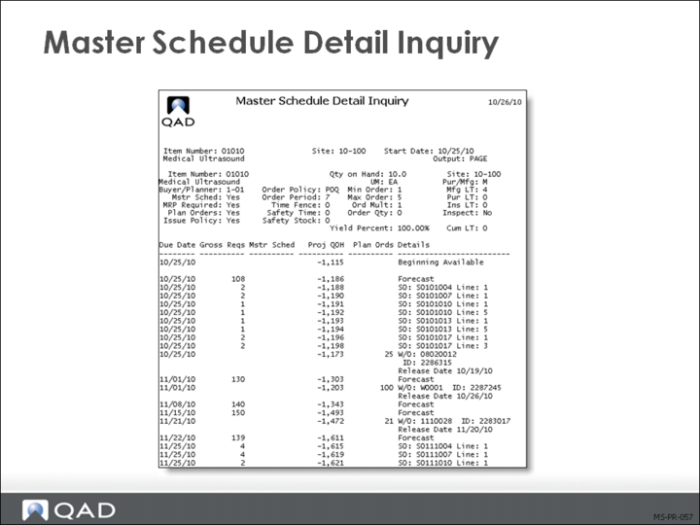
Master Schedule Detail Inquiry
The Master Schedule Detail Inquiry (22.21) provides a very different view of the MPS item. This view shows in a vertical list format each transaction, by date, that effects the item at this site. The display also shows detail information about both the source of the demand and the supply.
This example shows the demand that is from a production forecast for a higher level planning item. We also see the system has planned an MRP W/O to satisfy that demand, and its release date. Once the work orders are firmed (approved) or released the quantity will move into the Master Schedule column.
As with the summary inquiry the header shows the item planning data.