Sales Order Maintenance (Abnormal Demand)
Abnormal demand is usually a large, unexpected sale.
S
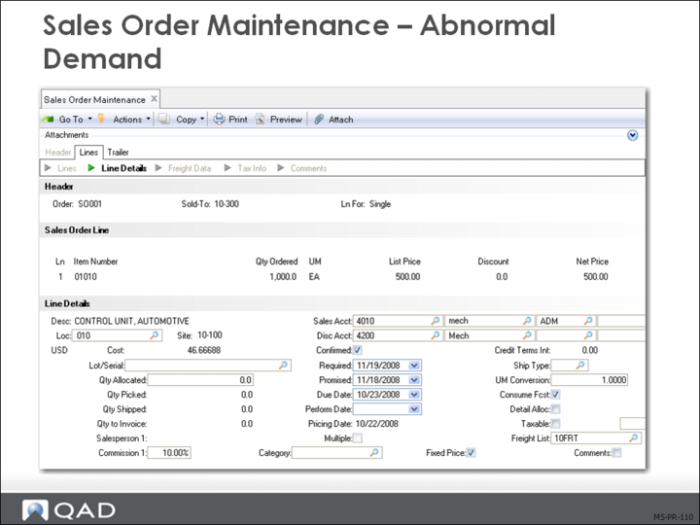
In some circumstances, the master scheduler may not want forecast consumption to occur. This would be the case when an unexpected sales order is received, which was not part of the forecast and should not be considered for the next year’s forecast.
To indicate a sales order as Abnormal Demand in QAD Enterprise Applications, set Consume Forecast to No in Sales Order Maintenance (7.1.1). MRP will now plan this independent demand requirement without consuming forecasts for the period.
Some Causes of Abnormal Demand
• Unplanned orders received due to:
• Hurricanes
• Earthquakes
• Floods
• New customers
• New markets
• These types of orders generally do not apply to forecasts
In the case of new customers and new markets a decision needs to be made whether these reflect ongoing business in which case you will want to adjust the forecast to take them into account.
Forecast Worksheet Maintenance
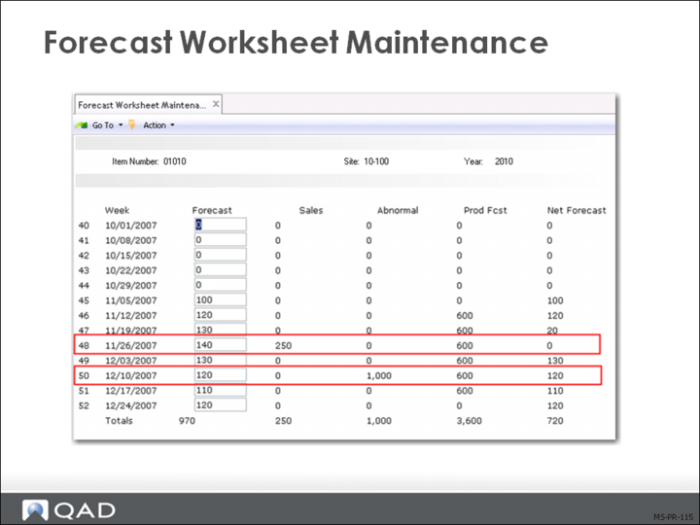
Forecast Worksheet Maintenance (22.2) shows 13 weeks per frame and cycles through however much data you have entered. It is a very useful screen in that it displays the current forecast, actual sales by period, abnormal sales, the production forecast and the net forecast. In addition it is a maintenance screen so you can modify the forecast as required.
In the screen above note that the sale in period 48 has consumed the forecast in the current period and gone back a period to consume the balance of the sale as specified in the consume forward and back logic in Sales Order Control (7.1.24).
The abnormal sale in period 50 has not consumed the forecast. The sales order Consume Forecast field was unchecked on this sale order.
The production forecast comes from the forecast for the family item set up earlier and is showing how many of this item are required based on the percent distribution of the family.
It is very helpful for the master scheduler to understand the sources of demand for the various items. The master scheduler might also detect on this screen a very large sales order that was consuming forecast when it should not because someone failed to set Consume Forecast to No.