Item Resource Load Summary Inquiry/Report
Calculating Load
Item Resource Load Inquiries (21.21) and Reports (21.22) can be run after the:
• Resource has been entered
• Conversion factor and lead times have been set up
QAD Enterprise Applications calculates the load automatically using the scheduled end-item quantities and the Resource Qty Per entered in Item Resource Bill Maintenance (21.17).
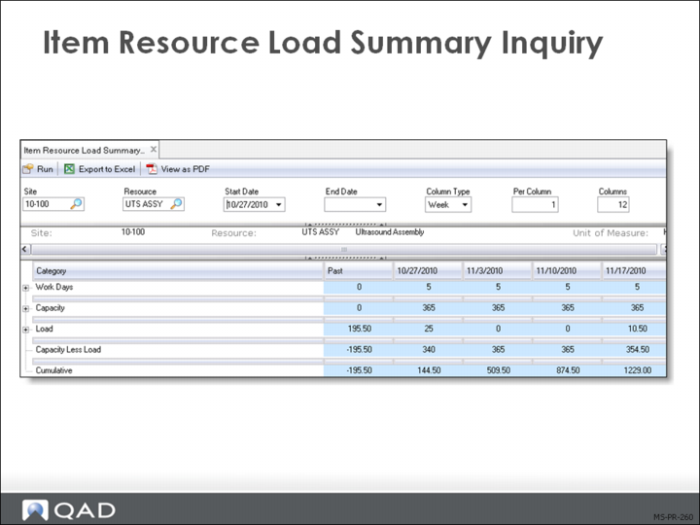
The Item Resource Load Summary displays the:
• Resource capacity
• Required resource capacity (production load) to meet scheduled production
• In daily, weekly, or monthly buckets
• The load is subtracted from capacity
• Over-capacity appears as a negative number in the Over/Under row
• Under-capacity appears as a positive number
Cumulative Over/Under Load
The cumulative column displays the Over/Under quantity added to any over- or under-capacity from past planning periods.
Item Resource Load Summary Report
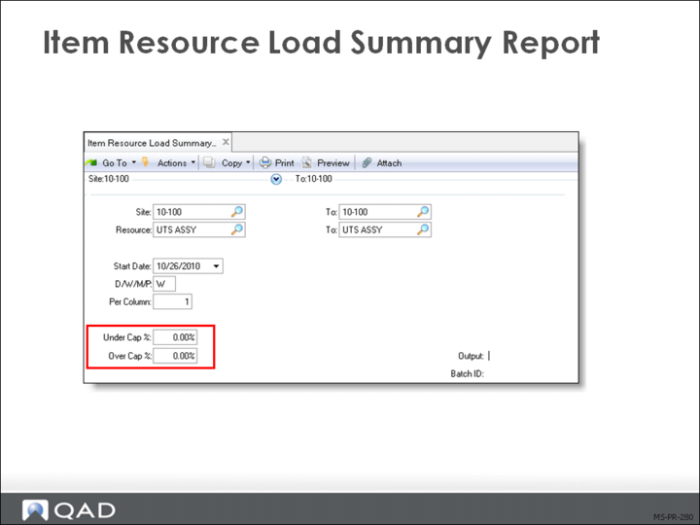
While the Item Resource Load Summary Report (21.22) shows the same information as Item Resource Load Summary Inquiry (21.21) it does allow selection based on a range of over/under percentage. This can be useful to filter out very small over/under loads to focus on the serious capacity issues.
For each resource, you can define resource bills (load profiles) that specify the amount of the resource required to manufacture a product line or item.
Resource planning:
• Evaluates the feasibility of production plans and master schedules
• Identifies where adjustments are required
If the production plan needs more machine capacity, decrease production or increase machines.Catching the imbalance at this level allows adjustment of the plan before work is scheduled or customer promises are made.