Item Resource Load Detail Inquiry/Report
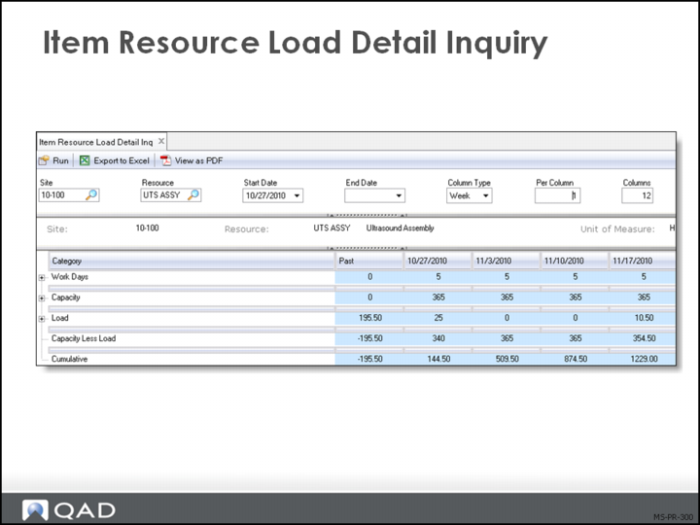
Item Resource Load Detail Inquiry
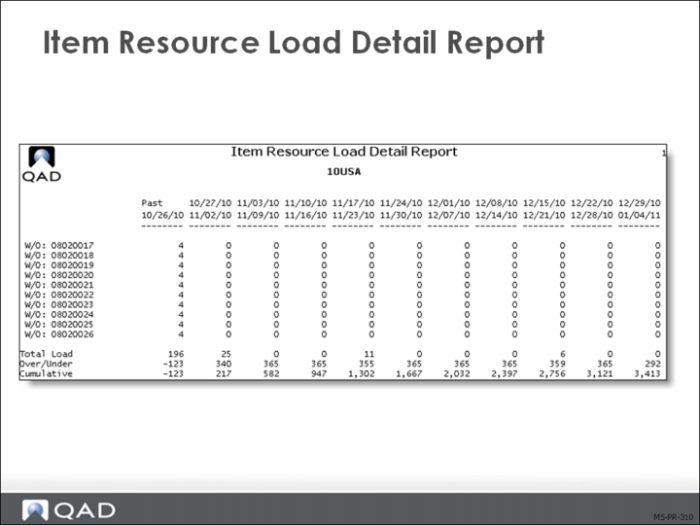
The item resource load detail inquiry and report show the detail of the orders that are creating the load. This example shows the work orders and items that are the specific labor load for this site. Once the summary has shown an overload condition exists, the master scheduler makes decisions about whether to schedule overtime, add extra shifts or reschedule the work orders. The detail reports will show the actual orders that may need to be rescheduled.
Item Resource Load Detail Report
While the data displayed are the same for the inquiry and report, some schedulers will prefer the format of the report, which can be viewed on the monitor or printed.
Note: In Enterprise Edition, an enhanced .NET UI-only version of Item Resource Load Detail Report is available on menu 21.48.
Exercise: Processing
Review a Seasonal Build Forecast
This exercise covers entering and reviewing a forecast and a seasonal build plan.
1 Item 01042 at site 10-100 is being introduced into a new marketplace 4 weeks from next Monday.
2 As a hedge against sales being greater than anticipated, you would like to have an additional 60 units in stock available on the date of the introduction. These will be produced in the two weeks prior to the introduction.
Use Seasonal Build Maintenance (22.9) to enter a seasonal build schedule using Monday dates.
Field | First Entry | Second Entry | Third Entry |
Site | 10-100 | 10-100 | 10-100 |
Item Number | 01042 | 01042 | 01042 |
Date | [2 wks prior] | [1 wk prior] | [Intro Date] |
Reference | Intro | Intro | Intro |
Seasonal Inventory | 30.0 | 60.0 | 0.0 |
3 Run a Seasonal Build Browse for item 01042 to ensure that the data has been entered correctly.
4 Run Selective Materials Plan (23.3) for item 01042.
5 Review the Master Schedule Summary Inquiry (22.18) and Master Schedule Detail Inquiry (22.21) to review the impact of the seasonal build.
Rough-Cut Capacity Planning
In this exercise, you will level a load using the rough-cut capacity planning (RCCP) process. The exercise includes creating master scheduled orders, running selective MRP, reviewing inquiries and reports, and increasing capacity to balance the load. Use item 01041, site 10-100 throughout the exercise.
1 Use Master Schedule Order Maintenance (22.13) to create a work order.
Field | Data |
Work Order | [blank] |
ID | [blank] |
Item Number | 01041 |
Type | [blank] |
Site | 10-100 |
Qty Ordered | 100 |
Order Date | [Today’s Date] |
Release Date | [Two weeks from today] |
Due Date | [Three weeks from today] |
2 Run Selective Materials Plan (23.3) for item 01041 at site 10-100.
3 Use Item Resource Bill Maintenance (21.17) to create an item resource bill for item 01041:
Field | Data |
Site: | 10-100 |
Resource: | Labor |
Start Date: | [blank] |
End Date: | [blank] |
Resource Qty. Per: | 4 |
Lead Time: | 1 |
4 Use Item Resource Load Summary Inquiry (21.21) to review the resource load for site 10-100, resource Labor. Is there enough capacity to do the plan?
5 Using Resource Maintenance (21.1), increase labor capacity for site 10-100. How much do you need to increase the daily labor supply?
6 Use Item Resource Load Summary Inquiry (21.21) and Item Resource Load Detail Inquiry (21.23) to review the effects of your changes.
Course Summary