Journal Entry Excel Cross-Company Integration
Use Journal Entry Cross-Cy Excel Integration (25.13.1.10) to load cross-company journal entries defined in an Excel spreadsheet.
To use the function, you must have access to all entities for which you want to create postings, and you must also be assigned role permissions that grant you access to Journal Entry Create in those entities.
You can only use Journal Entry Cross-Cy Excel Integration to create cross-company postings. Use Journal Entry Excel Integration to load any other type of journal entry postings through Excel.
Downloading the Template
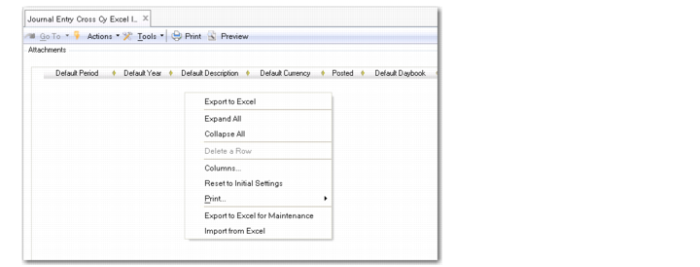
To facilitate the creation of cross-company journal entries, you can download a template in the Journal Entry Cross-Cy Excel Integration function. The Excel templates contains column headings that correspond to the grid in Journal Entry Cross-Cy Excel Integration.
To download an Excel template, right-click in the grid and select Export to Excel for Maintenance. At the prompt, enter the name of the spreadsheet in which to save the data. Open the spreadsheet in Excel and create your cross-company journal entry data.
Journal Entry Cross-Cy Excel Integration
Journal Entry Cross-Company Template