SI Posting Tab
The SI Posting tab displays the invoice posting details, based on the invoice amounts and accounts you have defined.
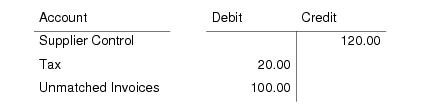
The default postings for invoices (when tax is applied at invoice) are as follows:
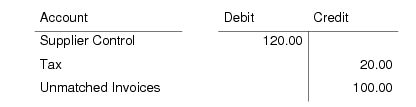
The postings are reversed for credit notes (when tax is applied at invoice):
The postings on the Supplier Control account and Unmatched Invoices account can have sub-account and cost center analysis. In this case, the sub-account details derive from the General tab.
When tax is applied, you cannot modify posting details on this tab, except the posting description, which also derives from the General tab.
The exchange rate defined on the General tab is used as a default for all posting lines involving multiple currencies.
Accounting Year/Period, Posting Date, Daybook Code, Number, Layer Type
These read-only details are copied from the General tab.
Description
The invoice description is copied from the General tab, and can be modified.
Template Code and Save as Template
These fields are not currently used.
External
When selected, indicates that the daybook used is external.
The following fields display in the SI Posting tab grid:
GL Account, Sub-Account, Cost Center, Description, Curr, BC Debit, BC Credit
The system loads these posting details, including the supplier invoice or credit note control account, Tax account, and Unmatched Invoices account, from the General tab. You cannot modify these posting lines.
You can expand some lines to see additional detail, such as the tax information and exchange rate details.
Currency View
Choose to view the transaction balance in the base or transaction currency.
Total
This field displays the sum of the debit and credit amounts of all posting lines.